Report Page: SQL Implementation for Sales Statistics
The Filter API can handle standard CRUD operations, but falls short when it comes to cross-table joins, grouped aggregations, and complex statistics. In such cases, you need custom SQL.
This article uses a sales data report as an example to demonstrate how to write SQL statements on the Lovrabet platform for complex data queries and statistics.
- When to use custom SQL
- Creating and managing custom SQL with CLI
- Calling custom SQL from the frontend
- Using sqlSafe to simplify error handling
Requirements
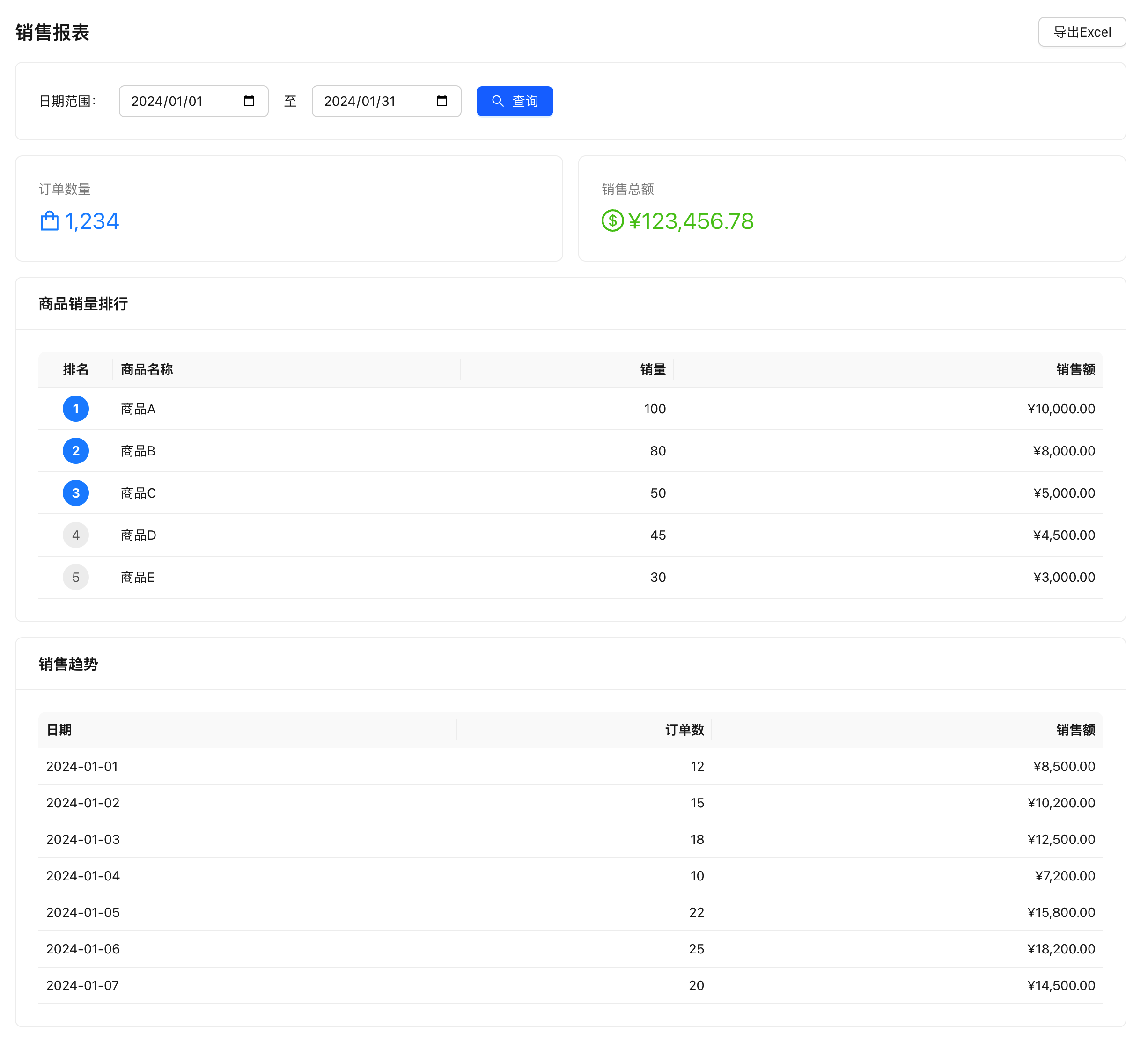
Implement a sales data report that includes: total sales statistics, sales volume grouped by product, sales trends grouped by date, with support for date range filtering.
Final Result:
When to Use Custom SQL?
| Scenario | Recommended API |
|---|---|
| Simple CRUD operations | Dataset API (filter, getOne) |
| Single-table conditional query | Filter API |
| Cross-table join queries | Custom SQL |
| Complex aggregation | Custom SQL |
| Grouped sum calculations | Custom SQL |
AI-Assisted Development (Recommended)
Without rabetbase, every report requires a dedicated backend API. Sales summary = one API + one SQL. Product ranking = another one. Sales trend = yet another. Backend wrote 3 SQL queries, but field names changed 4 times (orderId is not order_id, price is not unit_price, amounts are stored in cents not yuan). After the SQL was working, it still needed to be wrapped as an API: add authentication, parameter validation, error handling, configure CORS. 3 APIs took the backend 3 days, and the frontend waited another 3 days. During integration, parameter placeholders ? and {{param}} were mixed up, causing more errors. 3 reports took 2 weeks total for both frontend and backend.
With rabetbase: no backend APIs to write. The CLI's sql validate checks SQL syntax and field names (directly telling you which field name is wrong), and sql save saves to the platform. The frontend calls sql.execute('sqlCode', params) in one line. 3 SQL queries + 1 report page, no API wrapping, no waiting for backend, no integration debugging. Done in half a day.
All You Need to Tell AI
In Claude Code, enter:
Use rabetbase CLI to help me create a sales report page. I need three custom SQL queries: 1) salesSummary for order count and total amount; 2) productRanking for top 10 products by sales volume; 3) dailySalesTrend for daily sales trends. All should support date range filtering. Then generate the report page component.
What AI Will Do
AI will use rabetbase CLI to automatically complete the following:
- Query order, order detail, and product dataset structures (
rabetbase dataset detail) - Create 3 SQL files and save them to the platform (
rabetbase sql validate+rabetbase sql save) - Generate a complete frontend report page component (with queries, charts, export)
Once complete, the frontend page can call SQL to query report data. Below is the SQL and frontend code generated by AI.
Manual Operation (Alternative)
Implementation Code
Step 1: SQL File Code Reference
SQL 1: Sales Summary Statistics
.rabetbase/sql/salesSummary.sql:
-- @lovrabet sqlName=salesSummary description=Sales summary statistics
SELECT
COUNT(*) as orderCount,
COALESCE(SUM(total_amount), 0) as totalAmount
FROM dataset_orders
WHERE 1=1
<if test="startDate">
AND order_date >= #{startDate}
</if>
<if test="endDate">
AND order_date <= #{endDate}
</if>
SQL 2: Product Sales Ranking
SQL Name: productRanking
Create local SQL file .rabetbase/sql/productRanking.sql:
-- @lovrabet sqlName=productRanking description=Product sales ranking
SELECT
p.product_name,
SUM(oi.quantity) as totalQuantity,
SUM(oi.subtotal) as totalAmount
FROM dataset_order_items oi
JOIN dataset_orders o ON oi.order_id = o.id
JOIN dataset_products p ON oi.product_id = p.id
WHERE 1=1
<if test="startDate">
AND o.order_date >= #{startDate}
</if>
<if test="endDate">
AND o.order_date <= #{endDate}
</if>
GROUP BY p.product_name
ORDER BY totalAmount DESC
LIMIT 10
SQL 3: Daily Sales Trend
SQL Name: dailySalesTrend
Create local SQL file .rabetbase/sql/dailySalesTrend.sql:
-- @lovrabet sqlName=dailySalesTrend description=Daily sales trend
SELECT
DATE(order_date) as saleDate,
COUNT(*) as orderCount,
COALESCE(SUM(total_amount), 0) as totalAmount
FROM dataset_orders
WHERE 1=1
<if test="startDate">
AND order_date >= #{startDate}
</if>
<if test="endDate">
AND order_date <= #{endDate}
</if>
GROUP BY DATE(order_date)
ORDER BY saleDate
Key Points:
- Use
#{paramName}for parameterized queries - Use
<if test="">for dynamic SQL - Note XML escaping:
<=must be written as<=
Manual validation and save:
rabetbase sql validate --file .rabetbase/sql/salesSummary.sql --format json
rabetbase sql save --file .rabetbase/sql/salesSummary.sql --db <dbId> --format json
rabetbase sql exec --sqlcode salesSummary --params '{}' --format json
Step 2: Create Report Page Component
// src/pages/sales-report.tsx

/**
 * Title: Sales Report
 */
import { useState, useEffect } from "react";
import { lovrabetClient, sqlSafe } from "@lovrabet/sdk";

interface SalesSummary {
  orderCount: number;
  totalAmount: number;
}

interface ProductRanking {
  product_name: string;
  totalQuantity: number;
  totalAmount: number;
}

interface DailyTrend {
  saleDate: string;
  orderCount: number;
  totalAmount: number;
}

export default function SalesReport() {
  const [dateRange, setDateRange] = useState({
    startDate: getMonthStart(),
    endDate: new Date().toISOString().split("T")[0],
  });

  const [loading, setLoading] = useState(false);
  const [summary, setSummary] = useState<SalesSummary | null>(null);
  const [ranking, setRanking] = useState<ProductRanking[]>([]);
  const [trend, setTrend] = useState<DailyTrend[]>([]);

  // Fetch report data
  const fetchReport = async () => {
    setLoading(true);
    try {
      // Execute three SQL queries in parallel
      const [summaryResult, rankingResult, trendResult] = await Promise.all([
        querySummary(),
        queryRanking(),
        queryTrend(),
      ]);

      setSummary(summaryResult);
      setRanking(rankingResult);
      setTrend(trendResult);
    } catch (error) {
      console.error("Failed to fetch report:", error);
      alert("Failed to fetch report, please try again");
    } finally {
      setLoading(false);
    }
  };

  // Query sales summary
  const querySummary = async (): Promise<SalesSummary> => {
    const { data, error } = await sqlSafe(async () =>
      lovrabetClient.sql.execute({
        sqlCode: "salesSummary",
        params: dateRange,
      })
    );

    if (error || !data || data.length === 0) {
      return { orderCount: 0, totalAmount: 0 };
    }

    return data[0];
  };

  // Query product ranking
  const queryRanking = async (): Promise<ProductRanking[]> => {
    const { data, error } = await sqlSafe(async () =>
      lovrabetClient.sql.execute({
        sqlCode: "productRanking",
        params: dateRange,
      })
    );

    return data || [];
  };

  // Query sales trend
  const queryTrend = async (): Promise<DailyTrend[]> => {
    const { data, error } = await sqlSafe(async () =>
      lovrabetClient.sql.execute({
        sqlCode: "dailySalesTrend",
        params: dateRange,
      })
    );

    return data || [];
  };

  // Initial load
  useEffect(() => {
    fetchReport();
  }, []);

  // Format currency
  const formatMoney = (amount: number) => {
    return `¥${amount.toLocaleString("zh-CN", { minimumFractionDigits: 2 })}`;
  };

  // Export to Excel
  const handleExport = async () => {
    try {
      const fileUrl = await lovrabetClient.models.dataset_orders.excelExport({
        startDate: dateRange.startDate,
        endDate: dateRange.endDate,
      });
      window.open(fileUrl, "_blank");
    } catch (error) {
      console.error("Export failed:", error);
      alert("Export failed, please try again");
    }
  };

  return (
    <div className="sales-report">
      <div className="header">
        <h1>Sales Report</h1>
        <button onClick={handleExport}>Export Excel</button>
      </div>

      {/* Date filter */}
      <div className="filters">
        <label>
          Date Range:
          <input
            type="date"
            value={dateRange.startDate}
            onChange={(e) =>
              setDateRange({ ...dateRange, startDate: e.target.value })
            }
          />
          to
          <input
            type="date"
            value={dateRange.endDate}
            onChange={(e) =>
              setDateRange({ ...dateRange, endDate: e.target.value })
            }
          />
        </label>
        <button onClick={fetchReport} disabled={loading}>
          {loading ? "Querying..." : "Query"}
        </button>
      </div>

      {/* Sales summary */}
      {summary && (
        <div className="summary-card">
          <h3>Sales Summary</h3>
          <div className="stats">
            <div className="stat-item">
              <span className="label">Order Count</span>
              <span className="value">
                {summary.orderCount.toLocaleString()}
              </span>
            </div>
            <div className="stat-item">
              <span className="label">Total Sales</span>
              <span className="value">{formatMoney(summary.totalAmount)}</span>
            </div>
          </div>
        </div>
      )}

      {/* Product ranking */}
      {ranking.length > 0 && (
        <div className="ranking-card">
          <h3>Product Sales Ranking</h3>
          <table>
            <thead>
              <tr>
                <th>Rank</th>
                <th>Product Name</th>
                <th>Quantity Sold</th>
                <th>Sales Amount</th>
              </tr>
            </thead>
            <tbody>
              {ranking.map((item, index) => (
                <tr key={index}>
                  <td>{index + 1}</td>
                  <td>{item.product_name}</td>
                  <td>{item.totalQuantity}</td>
                  <td>{formatMoney(item.totalAmount)}</td>
                </tr>
              ))}
            </tbody>
          </table>
        </div>
      )}

      {/* Sales trend */}
      {trend.length > 0 && (
        <div className="trend-card">
          <h3>Sales Trend</h3>
          <table className="trend-table">
            <thead>
              <tr>
                <th>Date</th>
                <th>Orders</th>
                <th>Sales Amount</th>
              </tr>
            </thead>
            <tbody>
              {trend.map((item, index) => (
                <tr key={index}>
                  <td>{item.saleDate}</td>
                  <td>{item.orderCount}</td>
                  <td>{formatMoney(item.totalAmount)}</td>
                </tr>
              ))}
            </tbody>
          </table>
        </div>
      )}
    </div>
  );
}

// Get the first day of current month
function getMonthStart(): string {
  const now = new Date();
  return new Date(now.getFullYear(), now.getMonth(), 1)
    .toISOString()
    .split("T")[0];
}
Key Concepts Summary
SQL Execute API
Execute custom SQL queries:
// Using sqlSafe syntax sugar (recommended)
import { sqlSafe } from "@lovrabet/sdk";

const { data, error } = await sqlSafe(async () =>
  client.sql.execute({
    sqlCode: "xxxxx-xxxxx", // SQL code
    params: { startDate: "2024-01-01" }, // SQL parameters
  })
);

if (error) {
  console.error("Query failed:", error.message);
  return;
}

// data is the query result array
data.forEach((row) => console.log(row));
| Parameter | Type | Description |
|---|---|---|
sqlCode | string | SQL code (auto-generated when saved via CLI) |
params | Record<string, any> | Parameter object (corresponds to #{param} in SQL) |
Return Value:
interface SqlExecuteResult<T> {
  execSuccess: boolean; // Whether SQL executed successfully
  execResult?: T[]; // Query result array
}
sqlSafe Syntax Sugar
The SDK provides the sqlSafe function to simplify error handling:
// Without sqlSafe: need to manually check execSuccess
const result = await client.sql.execute({ sqlCode: "xxx" });
if (result.execSuccess && result.execResult) {
  console.log(result.execResult);
}

// With sqlSafe: single check
const { data, error } = await sqlSafe(() =>
  client.sql.execute({ sqlCode: "xxx" })
);

if (error) {
  console.error("Failed:", error.message);
  return;
}

console.log(data); // Direct result array
MyBatis Dynamic SQL Syntax
if Condition
SELECT * FROM dataset_orders
WHERE 1=1
  <if test="status">
    AND status = #{status}
  </if>
  <if test="startDate">
    AND create_time >= #{startDate}
  </if>
Note XML Escaping
| Character | Escaped |
|---|---|
< | < |
> | > |
& | & |
' | ' |
" | " |
<!-- Correct: use escaping -->
AND date <= #{endDate}
<!-- Incorrect: directly writing <= will be parsed as XML -->
AND date <= #{endDate}
Common Report SQL Templates
Grouped Statistics
SELECT
  category,
  COUNT(*) as count,
  SUM(amount) as total
FROM dataset_orders
GROUP BY category
Join Query
SELECT
  o.id,
  o.order_date,
  c.customer_name
FROM dataset_orders o
LEFT JOIN dataset_customers c ON o.customer_id = c.id
WHERE o.status = 'completed'
Ranking Query
SELECT
  product_name,
  sales_count,
  RANK() OVER (ORDER BY sales_count DESC) as rank
FROM (
  SELECT
    product_name,
    COUNT(*) as sales_count
  FROM dataset_orders
  GROUP BY product_name
) t
Date Range Statistics
SELECT
  DATE(create_time) as date,
  COUNT(*) as count
FROM dataset_orders
WHERE create_time >= #{startDate}
  AND create_time < #{endDate}
GROUP BY DATE(create_time)
Best Practices
Use Parameterized Queries
-- Recommended: parameterized query, prevents SQL injection
SELECT * FROM dataset_orders WHERE id = #{orderId}

-- Not recommended: string concatenation (unsafe)
SELECT * FROM dataset_orders WHERE id = ${orderId}
Use LIMIT Appropriately
-- Query all data (may be slow)
SELECT * FROM large_table

-- Use LIMIT to restrict number of returned rows
SELECT * FROM large_table LIMIT 1000
Query Only Required Fields
-- Not recommended: query all fields
SELECT * FROM dataset_orders

-- Recommended: query only required fields
SELECT id, order_date, total_amount FROM dataset_orders
Parallel Queries on Frontend
// Execute multiple SQL queries in parallel for better performance
const [summary, ranking, trend] = await Promise.all([
  querySummary(),
  queryRanking(),
  queryTrend(),
]);
FAQ
Q: SQL execution fails, execSuccess is false?
A: Common causes:
- SQL syntax error (check XML escaping)
- Incorrect table or field name
- Parameter type mismatch
Debugging Method: First use CLI to execute SQL and confirm correct syntax:
rabetbase sql exec --sqlcode <sqlcode> --params '{}' --format json
Q: sqlSafe not found?
A: Make sure SDK version >= 1.3.7, or use the traditional method:
import { sqlSafe } from "@lovrabet/sdk"; // v1.3.7+
Q: How to handle large volume reports?
A:
- Use
LIMITto restrict returned rows - Add date range filtering
- Use paginated queries
- Consider using background tasks for pre-calculation
Q: What's the difference between SQL API return values in frontend and BFF?
A:
| Environment | Return Value | Data Access Method |
|---|---|---|
| Frontend SDK | { execSuccess, execResult } | Check execSuccess |
| Backend Function | Returns array directly | Use result directly |
// Frontend SDK
const result = await client.sql.execute({ sqlCode: "xxx" });
if (result.execSuccess && result.execResult) {
  result.execResult.forEach(...);
}

// Backend Function
const rows = await context.client.sql.execute({ sqlCode: "xxx" });
rows.forEach(...); // Direct array
Section Summary
Congratulations on learning custom SQL queries! Key knowledge points:
| Knowledge Point | Description |
|---|---|
sql.execute() | Execute custom SQL |
sqlSafe() | Syntax sugar to simplify error handling |
| MyBatis Syntax | #{param} parameterization, <if test=""> dynamic SQL |
| XML Escaping | <= must be written as <= |
- Use parameterized queries to prevent SQL injection
- Query only required fields, use LIMIT to restrict rows
- Use Promise.all on frontend for parallel SQL queries
- Consider using Backend Function for pre-calculation in complex reports
Next Steps
- Pre-save Data Validation -- Learn automatic validation before data operations
Related Reading
Core Documentation
- SQL API Guide -- Complete custom SQL query documentation
- SQL Tutorial -- SQL best practices and performance optimization
- Syntax Sugar -- Convenient functions like sqlSafe
Advanced Topics
- Backend Function Calling SQL -- BF calling custom SQL
- Multi-table Join Queries -- Comparison of filter multi-table queries and SQL
- Filter API Complete Guide -- Filter API advanced queries
Difficulty Level: L2 | Estimated Time: 40 minutes