Backend Function (II): Post-validation Hook - Data Masking and Processing
The previous article covered Pre-validation Hooks -- validation before data writes. This article covers Post-validation Hooks -- processing data before it's returned to the frontend.
Sensitive information like phone numbers and ID cards should not be exposed directly to the frontend; some fields need dynamic calculation (such as calculating age from birthday); date formats need to be standardized. All of these can be handled centrally in Post-validation Hooks, so the data the frontend receives is already processed.
- What is a Post-validation Hook (After Script)
- How to implement data masking
- Dynamically calculating field values
- Auto-populating related data
Requirements
Automatically complete the following before data is returned to the frontend:
- Sensitive data masking (hiding middle digits of phone numbers, ID numbers)
- Dynamically calculated fields (calculating age from birthday, level from spending amount)
- Data format conversion (date formatting)
- Related data enrichment (automatically querying and populating related table information)
Database query results
    |
Post-validation Hook (data processing)
    |
Return to frontend (masked, calculated, formatted)
Core Concepts
Post-validation Hooks, also called After Scripts or HOOK post-scripts, are automatically triggered after data operations execute and before returning to the frontend. You can modify the returned data structure here.
| Feature | Description |
|---|---|
| Trigger timing | After operations like filter, getOne, create, update, etc. |
| Execution location | Backend (Lovrabet server environment) |
| Function naming | afterFilter, afterCreate, afterGetOne, etc. |
Unlike processing data on the frontend, After Scripts execute uniformly on the backend, so the frontend doesn't need to worry about masking and formatting logic.
Implementation Steps
AI-Assisted Development (Recommended)
Without rabetbase, the backend returns raw data -- phone numbers in plaintext, ID numbers in plaintext, dates as timestamps. You can't change the backend code. You have to mask data in every frontend component: 10 components display customer information, and the masking logic is duplicated 10 times. Compliance says "change the masking rule, mask 3 middle digits instead of 4" -- you search globally for 47 occurrences, miss 2, and data leaks. And the raw data is still in the API response, visible to anyone who opens F12. Frontend masking is self-deception. Worse yet: every new frontend colleague doesn't know which fields need masking, forgets to add it in new components, and data leaks again.
With rabetbase: no need to duplicate masking logic in every component. The BaaS afterFilter handles it uniformly on the backend -- all query results go through masking, and even F12 shows masked data. The CLI's bff new --type HOOK creates an afterFilter scaffold, masking rules written in one place, change once and it takes effect globally. bff push deploys and activates. Not a single line of frontend component code changes, and new colleagues won't miss anything.
All You Need to Tell AI
In Claude Code, enter:
Use rabetbase CLI to help me create a Post-validation Hook (HOOK After) for the filter operation on the customer dataset, performing data masking on phone numbers, ID numbers, and bank card numbers, while calculating age and customer level, formatting dates, and hiding internal fields based on user role.
What AI Will Do
AI will use rabetbase CLI to automatically complete the following:
- Query the customer dataset structure (
rabetbase dataset detail) - Create a HOOK scaffold (
rabetbase bff new --type HOOK) - Write complete masking and calculation logic (phone/ID/bank card masking, age calculation, level calculation, date formatting, permission control)
- Push to the platform to take effect (
rabetbase bff push)
Once complete, all customer data queried via filter will be automatically masked and calculated. No frontend code changes required. Below is the complete code generated by AI.
Manual Operation (Alternative)
Method 1: Manual CLI
# 1. Create scaffold
rabetbase bff new --type HOOK --name afterFilter --function-node after --alias customers --operation-type filter

# 2. Open the generated file in editor
code .rabetbase/bff/<appCode>/HOOK/customers/filter/after/afterFilter.js

# 3. Push
rabetbase bff push --yes --type HOOK --name afterFilter
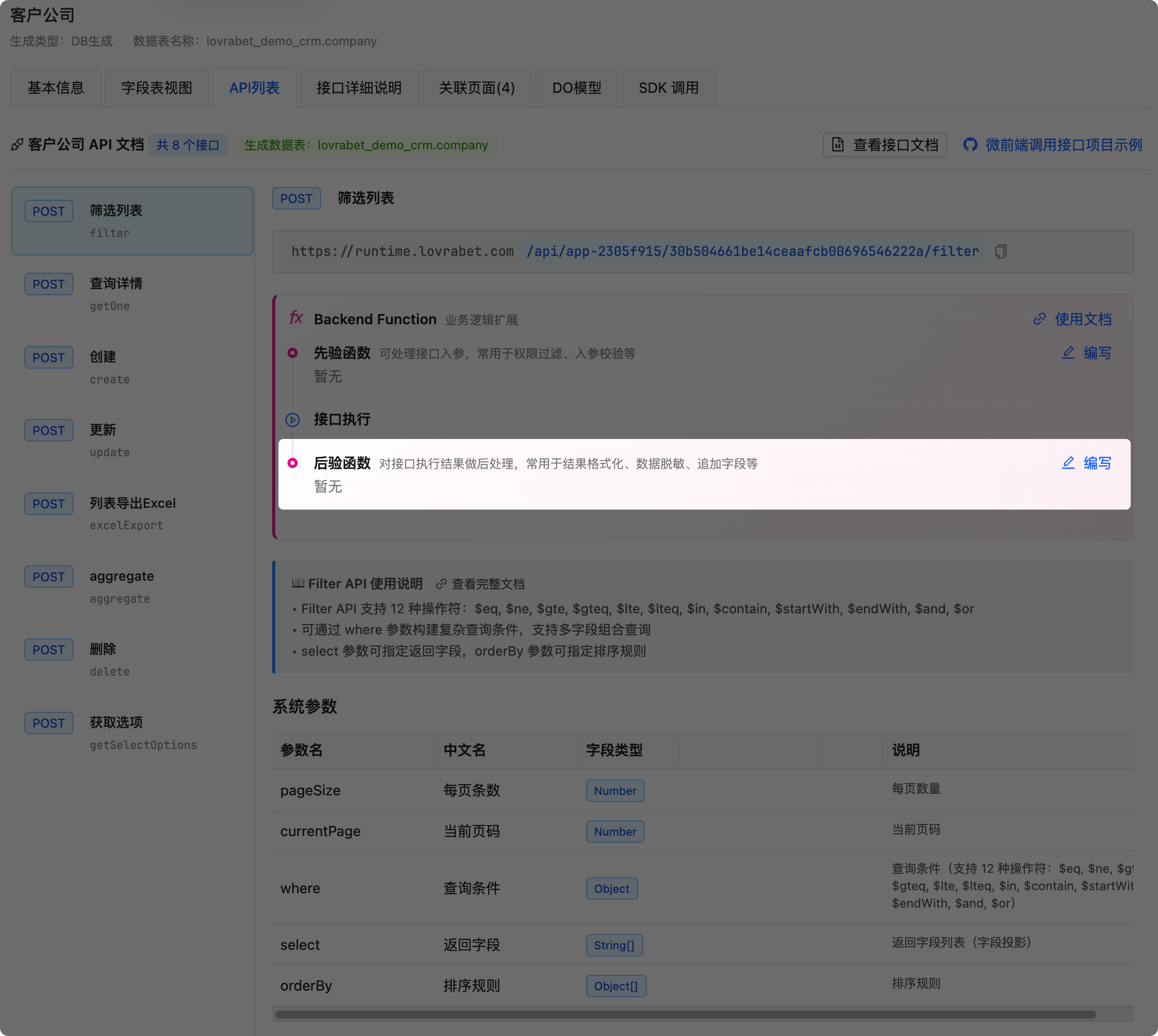
Method 2: Platform UI
- Open the dataset's API list page:
https://app.lovrabet.com/app/{appCode}/data/dataset/{datasetId}#api-list - Select the operation to configure (e.g.,
filterquery operation) - In the "Business Logic Extension" section, find the "Post-validation Hook" card
- Click the "Write" button, paste the code and save
Step 1: Complete Code Reference
Whether using AI or manual operation, the Post-validation Hook code created is as follows:
/**
 * Customer Data Post-validation Hook - After Script
 * Automatically masks and formats customer data before returning
 *
 * [API Path] POST /api/{appCode}/customers/filter
 * Rule: /api/{appCode}/{datasetCode}/filter
 *
 * [Platform Configuration] https://app.lovrabet.com/app/{appCode}/data/dataset/{datasetId}#api-list
 * Note: appCode is the application code, datasetId is the dataset ID (integer, obtained from MCP get_dataset_detail)
 *
 * [HTTP Request Body Parameters]
 * { "where": {...}, "select": [...] }
 *
 * [Return Data Structure]
 * HOOK: Returns modified params object (containing tableData, tableColumns)
 *
 * @param {Object} params - filter return result
 * @param {Array} params.tableData - data list
 * @param {Object} params.tableColumns - column definitions
 * @param {Object} context - Execution context (automatically injected by platform, no need to pass when calling)
 * @param {Object} context.userInfo - Current user information
 * @returns {Object} Returns modified params
 */
export default async function afterFilter(params, context) {
  // Dataset code mapping table
  const TABLES = {
    customers: "dataset_XXXXXXXXXX", // Dataset: Customers | Table: customers (replace with actual 32-character code)
  };
  const models = context.client.models;

  console.log("[Post-validation Hook] Starting data processing");

  // Process list data (After Script operates on params.tableData)
  if (params.tableData) {
    params.tableData = params.tableData.map((item) =>
      processCustomer(item, context)
    );
  }

  return params;
}

/**
 * Process a single customer record
 */
function processCustomer(customer, context) {
  if (!customer) return customer;

  // ========== 1. Sensitive Data Masking ==========
  if (customer.phone) {
    customer.phone = maskPhone(customer.phone);
    customer.phoneOriginal = undefined; // Ensure original data is not returned
  }

  if (customer.idCard) {
    customer.idCard = maskIdCard(customer.idCard);
  }

  if (customer.bankAccount) {
    customer.bankAccount = maskBankAccount(customer.bankAccount);
  }

  // ========== 2. Dynamically Calculated Fields ==========
  // Calculate customer age
  if (customer.birthday) {
    customer.age = calculateAge(customer.birthday);
  }

  // Calculate customer level (based on spending amount)
  if (customer.totalAmount !== undefined) {
    customer.level = calculateLevel(customer.totalAmount);
  }

  // ========== 3. Format Conversion ==========
  // Date formatting
  if (customer.createTime) {
    customer.createTimeFormatted = formatDate(customer.createTime);
  }

  if (customer.lastLoginTime) {
    customer.lastLoginTimeFormatted = formatDate(customer.lastLoginTime);
  }

  // ========== 4. Status Display Name ==========
  if (customer.status) {
    customer.statusName = getStatusName(customer.status);
  }

  // ========== 5. Permission Control: Hide Internal Fields ==========
  const user = context.userInfo;
  if (user?.role !== "admin") {
    delete customer.internalNotes;
    delete customer.creditScore;
  }

  return customer;
}

// ========== Utility Functions ==========

/**
 * Phone number masking: 138****8000
 */
function maskPhone(phone) {
  if (!phone || phone.length < 11) return phone;
  return phone.replace(/(\d{3})\d{4}(\d{4})/, "$1****$2");
}

/**
 * ID card masking: 320***********1234
 */
function maskIdCard(idCard) {
  if (!idCard || idCard.length < 18) return idCard;
  return idCard.replace(/^(.{3}).*(.{4})$/, "$1***********$2");
}

/**
 * Bank account masking: 6222***********1234
 */
function maskBankAccount(account) {
  if (!account || account.length < 16) return account;
  return account.replace(/^(.{4}).*(.{4})$/, "$1***********$2");
}

/**
 * Calculate age
 */
function calculateAge(birthdayStr) {
  const today = new Date();
  const birthDate = new Date(birthdayStr);
  let age = today.getFullYear() - birthDate.getFullYear();
  const monthDiff = today.getMonth() - birthDate.getMonth();

  if (
    monthDiff < 0 ||
    (monthDiff === 0 && today.getDate() < birthDate.getDate())
  ) {
    age--;
  }

  return age;
}

/**
 * Calculate customer level based on spending amount
 */
function calculateLevel(totalAmount) {
  if (totalAmount >= 50000) return "Diamond";
  if (totalAmount >= 20000) return "Gold";
  if (totalAmount >= 5000) return "Silver";
  return "Regular";
}

/**
 * Format date
 */
function formatDate(dateStr) {
  const date = new Date(dateStr);
  const year = date.getFullYear();
  const month = String(date.getMonth() + 1).padStart(2, "0");
  const day = String(date.getDate()).padStart(2, "0");
  const hours = String(date.getHours()).padStart(2, "0");
  const minutes = String(date.getMinutes()).padStart(2, "0");

  return `${year}-${month}-${day} ${hours}:${minutes}`;
}

/**
 * Get status display name
 */
function getStatusName(status) {
  const names = {
    potential: "Potential",
    dealed: "Closed",
    lost: "Lost",
    active: "Active",
    inactive: "Inactive",
  };
  return names[status] || status;
}
Step 2: Push to Platform
After writing the code, push it to the platform to take effect. If using AI-assisted development, this step is already done automatically.
Manual push:
rabetbase bff status --format json
rabetbase bff push --dry-run --type HOOK --name afterFilter --format json
rabetbase bff push --yes --type HOOK --name afterFilter
You can also edit via the platform UI: https://app.lovrabet.com/app/{appCode}/data/dataset/{datasetId}#api-list, click "Write" in the "Post-validation Hook" card.
Step 3: Frontend Receives Processed Data
No frontend code changes needed -- the data received is already processed:
// Query list
const result = await lovrabetClient.models.dataset_customers.filter({
  where: { status: { $eq: "active" } },
});

// Data is already masked and calculated
console.log(result.tableData[0]);
// Output:
// {
//   id: 123,
//   name: "Zhang San",
//   phone: "138****8000",  // Already masked
//   age: 28,               // Already calculated
//   level: "Gold",         // Already calculated
//   statusName: "Active",  // Already formatted
//   createTimeFormatted: "2024-01-15 10:30"  // Already formatted
// }
Advanced Scenarios
Auto-Populating Related Data
/**
 * Order query post-script - Auto-populate related data
 * Automatically queries and populates customer info and order details when returning orders
 *
 * [API Path] POST /api/{appCode}/orders/filter
 *
 * [Platform Configuration] https://app.lovrabet.com/app/{appCode}/data/dataset/{datasetId}#api-list
 *
 * @param {Object} params - filter return result
 * @param {Array} params.tableData - data list
 * @param {Object} context - Execution context (automatically injected by platform)
 * @returns {Object} Returns modified params
 */
export default async function afterFilter(params, context) {
  // Dataset code mapping table
  const TABLES = {
    orders: "dataset_XXXXXXXXXX", // Dataset: Orders | Table: orders
    customers: "dataset_YYYYYYYYYY", // Dataset: Customers | Table: customers
    orderItems: "dataset_ZZZZZZZZZZ", // Dataset: Order Items | Table: order_items
  };
  const models = context.client.models;

  if (!params.tableData || params.tableData.length === 0) {
    return params;
  }

  // Batch get customer IDs and order IDs
  const customerIds = [
    ...new Set(params.tableData.map((o) => o.customerId).filter(Boolean)),
  ];
  const orderIds = [
    ...new Set(params.tableData.map((o) => o.id).filter(Boolean)),
  ];

  // Batch query customer data
  let customerMap = new Map();
  if (customerIds.length > 0) {
    const customers = await models[TABLES.customers].filter({
      where: { id: { $in: customerIds } },
    });
    customerMap = new Map(customers.tableData.map((c) => [c.id, c]));
  }

  // Batch query order items
  let itemsMap = new Map();
  if (orderIds.length > 0) {
    const allItems = await models[TABLES.orderItems].filter({
      where: { orderId: { $in: orderIds } },
    });
    // Group by order ID
    allItems.tableData.forEach((item) => {
      if (!itemsMap.has(item.orderId)) {
        itemsMap.set(item.orderId, []);
      }
      itemsMap.get(item.orderId).push(item);
    });
  }

  // Enrich order data
  params.tableData.forEach((order) => {
    // Populate customer info
    const customer = customerMap.get(order.customerId);
    if (customer) {
      order.customerName = customer.name;
      order.customerPhone = customer.phone; // Already masked
      order.customerLevel = customer.level;
    }

    // Populate order items
    order.items = itemsMap.get(order.id) || [];

    // Calculate order status display
    order.statusText = getOrderStatusText(order.status);
  });

  return params;
}

function getOrderStatusText(status) {
  const texts = {
    pending: "Pending Payment",
    paid: "Paid",
    shipped: "Shipped",
    completed: "Completed",
    cancelled: "Cancelled",
  };
  return texts[status] || status;
}
Multi-Language Data Conversion
/**
 * Product query post-script - Return corresponding language based on user language preference
 *
 * [API Path] POST /api/{appCode}/products/filter
 *
 * [Platform Configuration] https://app.lovrabet.com/app/{appCode}/data/dataset/{datasetId}#api-list
 *
 * @param {Object} params - filter return result
 * @param {Array} params.tableData - data list
 * @param {Object} context - Execution context (automatically injected by platform)
 * @returns {Object} Returns modified params
 */
export default async function afterFilter(params, context) {
  // Get user language preference (default to Chinese)
  const lang = context.userInfo?.language || "zh-CN";

  const processItem = (item) => {
    // Select field based on language
    if (lang.startsWith("en")) {
      item.displayName = item.nameEn || item.name;
      item.description = item.descriptionEn || item.description;
    } else if (lang.startsWith("zh")) {
      item.displayName = item.nameZh || item.name;
      item.description = item.descriptionZh || item.description;
    } else {
      item.displayName = item.name;
      item.description = item.description;
    }

    // Format amount (based on region)
    if (item.amount) {
      if (lang === "en-US") {
        item.amountFormatted = `$${item.amount.toLocaleString()}`;
      } else {
        item.amountFormatted = `¥${item.amount.toLocaleString()}`;
      }
    }

    return item;
  };

  if (params.tableData) {
    params.tableData = params.tableData.map(processItem);
  }

  return params;
}
Data Aggregation and Statistics
/**
 * Order query post-script - Add aggregation statistics to list data
 *
 * [API Path] POST /api/{appCode}/orders/filter
 *
 * [Platform Configuration] https://app.lovrabet.com/app/{appCode}/data/dataset/{datasetId}#api-list
 *
 * @param {Object} params - filter return result
 * @param {Array} params.tableData - data list
 * @param {Object} context - Execution context (automatically injected by platform)
 * @returns {Object} Returns modified params
 */
export default async function afterFilter(params, context) {
  if (!params.tableData || params.tableData.length === 0) {
    return params;
  }

  const items = params.tableData;

  // Calculate statistics
  const stats = {
    total: items.length,
    totalAmount: items.reduce((sum, item) => sum + (item.amount || 0), 0),
    highValueCount: items.filter((item) => (item.amount || 0) > 10000).length,
    statusDistribution: {},
  };

  // Status distribution
  items.forEach((item) => {
    const status = item.status || "unknown";
    stats.statusDistribution[status] =
      (stats.statusDistribution[status] || 0) + 1;
  });

  // Add statistics to result
  params.statistics = stats;

  return params;
}
Building Tree Structure Data
/**
 * Department query post-script - Convert flat data to tree structure
 * Suitable for hierarchical data like departments, categories, etc.
 *
 * [API Path] POST /api/{appCode}/departments/filter
 *
 * [Platform Configuration] https://app.lovrabet.com/app/{appCode}/data/dataset/{datasetId}#api-list
 *
 * @param {Object} params - filter return result
 * @param {Array} params.tableData - data list
 * @param {Object} context - Execution context (automatically injected by platform)
 * @returns {Object} Returns modified params
 */
export default async function afterFilter(params, context) {
  if (!params.tableData || params.tableData.length === 0) {
    return params;
  }

  const items = params.tableData;

  // Build tree structure
  const buildTree = (parentId = null) => {
    return items
      .filter((item) => item.parentId === parentId)
      .map((item) => ({
        ...item,
        children: buildTree(item.id),
      }));
  };

  const tree = buildTree(null);

  // Return both flat data and tree data
  params.treeData = tree;

  return params;
}
Key Concepts Summary
After Script Function Signature
/**
 * After Script example
 *
 * [API Path] POST /api/{appCode}/{datasetCode}/filter
 *
 * [Platform Configuration] https://app.lovrabet.com/app/{appCode}/data/dataset/{datasetId}#api-list
 *
 * @param {Object} params - filter return result
 * @param {Array} params.tableData - data list
 * @param {Object} params.tableColumns - column definitions
 * @param {Object} context - Execution context (automatically injected by platform)
 * @returns {Object} Returns modified params
 */
export default async function afterFilter(params, context) {
  // Operate on params.tableData
  if (params.tableData) {
    params.tableData = params.tableData.map((item) => {
      // Process data
      return item;
    });
  }

  return params;
}
params Parameter (After Phase)
| Field | Type | Description |
|---|---|---|
tableData | Array | Data list |
tableColumns | Object | Column definitions |
paging | Object | Pagination info (filter API) |
Data Processing Considerations
// Correct: Return processed params
export default async function afterFilter(params, context) {
  if (params.tableData) {
    params.tableData = params.tableData.map(item => {
      item.processed = true;
      return item;
    });
  }

  return params; // Must return
}

// Wrong: Forgot to return data
export default async function afterFilter(params, context) {
  // Process data...
  // Forgot to return
}
Best Practices
Sensitive Data Masking
// Unified masking function
function maskSensitive(value, type) {
  if (!value) return value;

  const masks = {
    phone: (v) => v.replace(/(\d{3})\d{4}(\d{4})/, "$1****$2"),
    email: (v) => v.replace(/(.{2}).*(@.*)/, "$1***$2"),
    idcard: (v) => v.replace(/^(.{3}).*(.{4})$/, "$1***********$2"),
    bankcard: (v) => v.replace(/^(.{4}).*(.{4})$/, "$1***********$2"),
  };

  return masks[type] ? masks[type](value) : value;
}
Permission Control
// Decide whether to show certain fields based on user role
function filterFieldsByRole(data, user) {
  const sensitiveFields = ["internalNotes", "creditScore"];

  if (user?.role !== "admin") {
    sensitiveFields.forEach((field) => delete data[field]);
  }

  return data;
}
Batch Query Optimization
// For batch queries, use a single query to get all data
async function enrichWithCustomer(orders, context) {
  const TABLES = {
    customers: "dataset_XXXXXXXXXX", // Dataset: Customers | Table: customers
  };
  const models = context.client.models;

  // Collect all customer IDs
  const customerIds = [
    ...new Set(orders.map((o) => o.customerId).filter(Boolean)),
  ];

  // Query all customers at once
  const customers = await models[TABLES.customers].filter({
    where: { id: { $in: customerIds } },
  });

  // Build Map
  const customerMap = new Map(customers.tableData.map((c) => [c.id, c]));

  // Enrich order data
  orders.forEach((order) => {
    const customer = customerMap.get(order.customerId);
    if (customer) {
      order.customerName = customer.name;
    }
  });

  return orders;
}
FAQ
Q: Will Post-validation Hooks affect performance?
A: Yes, since they execute on every query. Recommendations:
- Avoid complex queries: Minimize database queries in Post-validation Hooks
- Use batch queries: When processing lists, use
filterto query all related data at once - Add caching: Use caching for data that doesn't change frequently
// Not recommended: Query in loop
for (const order of orders) {
  const customer = await models[TABLES.customers].findOne({
    id: order.customerId,
  });
  order.customerName = customer.name;
}

// Recommended: Batch query
const customerIds = orders.map((o) => o.customerId);
const result = await models[TABLES.customers].filter({
  where: { id: { $in: customerIds } },
});
const customerMap = new Map(result.tableData.map((c) => [c.id, c]));
orders.forEach((order) => {
  order.customerName = customerMap.get(order.customerId)?.name;
});
Q: Can Pre-validation and Post-validation Hooks be used together?
A: Yes. They are independent and can be configured simultaneously:
| Function | Execution Timing | Purpose |
|---|---|---|
| Pre-validation Hook | Before operation | Validation, permission control, data enrichment |
| Post-validation Hook | After operation | Masking, format conversion, related data |
Q: What if an error occurs in the Post-validation Hook?
A: Errors in Post-validation Hooks won't affect data operations, but will affect the returned result:
export default async function transform(params, context) {
  try {
    // Processing logic
    return processResult(params.result);
  } catch (error) {
    console.error("[Post-validation Hook] Processing failed:", error);
    // Return original data to ensure frontend at least gets data
    return params.result;
  }
}
Q: How to check if data has been processed on the frontend?
A: You can add a marker field:
function processCustomer(customer) {
  customer._processed = true; // Add processing marker
  customer.phone = maskPhone(customer.phone);
  return customer;
}

// Frontend check
if (customer._processed) {
  console.log("Data has been masked");
}
Section Summary
Congratulations on learning Post-validation Hooks! Key points:
| Knowledge Point | Description |
|---|---|
| After Script | Function that automatically executes after data operations |
params.tableData | List data, can be modified directly |
| Data Masking | Processing sensitive information like phone numbers, ID cards |
| Dynamic Calculation | Derived fields like age, level |
- Sensitive data must be masked on the backend, cannot rely on frontend
- Use batch queries to optimize related data retrieval
- Add permission control to hide fields based on roles
- Catch exceptions to ensure data can be returned normally
Next Steps
- Complex Statistics SQL -- Learn to call SQL in Backend Functions
Related Reading
Core Documentation
- BFF API Reference -- Complete Backend Function usage guide
- Syntax Sugar -- Convenient functions like safe, sqlSafe
- Error Handling -- BF error catching and handling
Advanced Topics
- Data Validation: Pre-validation Hook -- Backend data validation and permission control
- Master-Detail Forms: Transaction Processing -- BF standalone endpoint for complex business logic
- Sales Reports: Custom SQL -- Using SQL queries for complex statistics
Difficulty Level: L2 | Estimated Time: 40 minutes