Developer Tools: CLI, SDK, MCP Overview
Understand the five core tools provided by Rabetbase and how they work together.
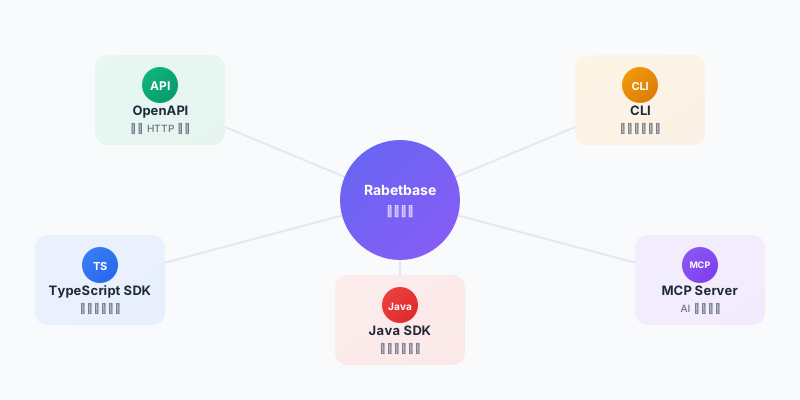
Five-Piece Toolchain Overview
Rabetbase provides a complete toolchain for developers, covering the full range of scenarios from API calls to AI-assisted development:
| Tool | One-Line Description | Core Value |
|---|---|---|
| OpenAPI | Standard HTTP APIs | Cross-language calls, third-party integration, no SDK dependency |
| CLI | Project lifecycle management | Create projects, generate configuration, sync menus, build and deploy |
| TypeScript SDK | Frontend data access | Type safety, unified error handling, efficient queries |
| Java SDK | Backend data access | Server-side complex business logic development |
| Skill | AI business intelligence engine | Enables AI to understand your business data and generate accurate code |
Below we introduce each tool and the problems it solves.
OpenAPI: Standard HTTP APIs
If you don't want to depend on any SDK, or need to make calls from Python, Go, PHP, or other languages, OpenAPI is the most direct choice.
curl -X POST https://runtime.lovrabet.com/openapi/data/get-list \
  -H "Content-Type: application/json" \
  -H "X-Time-Stamp: 1758903130713" \
  -H "X-App-Code: your-app-code" \
  -H "X-Dataset-Code: your-dataset-code" \
  -H "X-Token: your-signed-token" \
  -d '{"appCode": "your-app-code", "datasetCode": "your-dataset-code", "paramMap": {"pageSize": 10}}'
OpenAPI uses signature-based authentication (X-Header method), supporting both AccessKey and pre-generated Token modes. Any language that can make HTTP requests will work. For detailed authentication instructions, refer to the OpenAPI Authentication Guide.
CLI: Project Lifecycle Management
The CLI saves you from all the tedious tasks involved in project setup.
npm install -g @lovrabet/rabetbase-cli@latest

rabetbase auth login    # Login and authentication
rabetbase project create  # Create project
rabetbase run start     # Start development server
rabetbase api pull      # Pull dataset configuration, generate SDK code
rabetbase menu sync     # Sync menus to workspace
rabetbase run build     # Build production version
No need to set up project structures from scratch, no manual type definitions, no logging into the backend to add menus manually, no worrying about CORS issues -- the CLI handles it all.
TypeScript SDK: Frontend Data Access
The SDK provides type-safe APIs. Your IDE auto-completes field names and types, and error handling is unified.
import { lovrabetClient } from "@/api/client";

// List query (with filtering and pagination)
const result = await lovrabetClient.models.customers.filter({
  where: { status: { $eq: "active" } },
  select: ["id", "name", "phone"],
  orderBy: [{ createTime: "desc" }],
  pageSize: 20,
});

// Single record query
const customer = await lovrabetClient.models.customers.getOne(customerId);

// Create data
await lovrabetClient.models.customers.create({
  name: "张三",
  phone: "13800138000",
});

// Custom SQL (complex report scenarios)
const stats = await lovrabetClient.api.executeSql("sql-code-xxx", {
  startDate: "2024-01-01",
  endDate: "2024-12-31",
});
Cookie authentication is used automatically in the browser. Built-in support for pagination, filtering, and sorting.
Java SDK: Backend Data Access
If you have a Java backend service and need to handle complex business logic on the server side (batch operations, transaction management, scheduled tasks, etc.), you can use the Java SDK.
LovrabetClient client = new LovrabetClient(accessKey, secretKey);

// List query
FilterResult<Customer> result = client.models("customers")
    .filter(new FilterParams()
        .where("status", "active")
        .select("id", "name", "phone")
        .orderBy("createTime", "desc")
        .pageSize(20));

// Single record query
Customer customer = client.models("customers").getOne(customerId);

// Create data
client.models("customers").create(new Customer("张三", "13800138000"));
Credentials stay on the server side and are never exposed to the frontend. Seamlessly integrates with existing Java ecosystems.
Rabetbase Skill: Let AI Understand Your Business
Traditional AI can only "read documentation" -- it knows field names but doesn't understand business relationships. Rabetbase Skill enables AI to "understand the business" -- table associations, field meanings, and data flow are all visible to it.
Install in Cursor or Claude Code:
npx skills add lovrabet/rabetbase --global
Once installed, you can explore data directly in AI conversations:
You: List all datasets
AI: (calls rabetbase dataset list) Your application has 8 datasets...

You: Show me the fields of the customer table
AI: (calls rabetbase dataset detail) The customer table has the following fields: id, name, phone...

You: Help me build a customer list page
AI: (after understanding the data structure via Skill) Sure, let me generate the code...
Real-world results comparison:
| Scenario | Without Skill | With Skill |
|---|---|---|
| Data Exploration | 20-30 minutes (reading docs, testing APIs) | A few seconds |
| SQL Design | 30-60 minutes (repeated debugging) | 1-2 minutes |
| Code Generation Accuracy | 60-70% (requires multiple iterations) | 95%+ (essentially correct on first pass) |
| Complete Page Development | 2-3 hours | 10-15 minutes |
How the Five Tools Work Together
In actual development, these five tools complement each other as follows:
Before Development
  1. rabetbase project create → Create project
  2. rabetbase api pull      → Generate SDK configuration
  3. Install Rabetbase Skill → Let AI understand your data

During Development
  4. AI + Skill             → Explore data, generate code
  5. SDK calls              → Type-safe data operations
  6. rabetbase run start    → Real-time preview and debugging

After Development
  7. rabetbase run build    → Build production version
  8. rabetbase menu sync    → Sync menus to workspace
Practical Demo: User List Page
Suppose you need to build a user list page -- displaying basic info + membership tags + last login time, requiring a 3-table join.
Traditional approach: Look up documentation for field names (guess wrong, look up again) -> write SQL (wrong JOIN, rewrite) -> write code (misspelled field names, debug) -> repeat 4-5 rounds, taking 2-3 hours.
With Skill: Tell AI "I need a user list page showing basic info, membership tags, and last login time." AI analyzes table structures and relationships through Skill, generates complete code with all field names correct, and finishes in 10 minutes.
End-to-End Example: Order Management System
Below is an order management scenario demonstrating how to quickly complete development using AI + rabetbase CLI.
Without rabetbase, building an order management system means building a full-stack project. Frontend: 3 pages (list, detail, statistics). Backend: at least 5 APIs (order list, order detail, order update, monthly statistics SQL, product statistics SQL), plus authentication, CORS, error handling, and deployment. AI did generate frontend code -- but all the data is mocked, because the backend APIs haven't been written. You gave AI the API docs, and it wrote fetch calls -- but all the field names are wrong (customer_name is not name). Fixed the field names, now authentication is wrong (docs say X-Access-Key, AI sent Authorization: Bearer). Fixed authentication, now the response structure is wrong ({ items: [], total: 0 } is not { tableData: [], totalCount: 0 }). The list page still isn't working, and the statistics SQL is even worse -- four tables joined, JOIN conditions guessed wrong 3 times, and amounts are stored in cents not yuan. Frontend and backend together took 2 weeks, and only one list page barely works.
With rabetbase: no backend setup, no API writing, no integration testing. The database reverse-engineering engine has already analyzed the complete data model and relationships. CLI covers the full chain from project create to menu sync. Skill guides AI to write type-safe business code using the SDK. 10-15 minutes, every page works.
You Just Tell AI
Enter in Claude Code:
Use rabetbase CLI to help me develop an order management system. Create the project, pull API configuration, then generate: 1) Order list page (filter by status); 2) Order detail page (with editing support); 3) Custom SQL for monthly sales by customer. Finally, build and sync menus.
What AI Will Do
AI will use the rabetbase CLI and SDK to automatically complete the following steps:
- Install CLI and log in (
rabetbase auth login) - Create project (
rabetbase project create) - Pull API configuration (
rabetbase api pull) - Generate order list page (filter + status filtering)
- Generate order detail page (getOne + update)
- Create custom SQL (
rabetbase sql save) - Build and deploy (
rabetbase run build) - Sync menus (
rabetbase menu sync)
The entire process is reduced from the traditional 2-3 hours to 10-15 minutes.
Manual Steps (Complete Walkthrough)
Step 1: Environment Setup (CLI)
# 1. Install and log in
npm install -g @lovrabet/rabetbase-cli@latest
rabetbase auth login

# 2. Create project
rabetbase project create order-management

# 3. Generate SDK configuration
cd order-management
rabetbase api pull --appcode your-app-code
Step 2: Configure AI Assistance (Skill)
Install the Rabetbase Skill to let the AI assistant understand your business data:
npx skills add lovrabet/rabetbase --global
Step 3: Collaborative Development with AI
Sample conversation:
You: What datasets are available?

AI: (calls list_datasets) Your application has the following datasets:
- orders (Order table)
- customers (Customer table)
- products (Product table)
- order_items (Order items table)

You: Show me the field structure of the orders table

AI: (calls get_dataset_detail) The orders table has the following fields:
- id: Order ID (primary key)
- customer_id: Customer ID (foreign key to customers table)
- order_date: Order date
- status: Order status (enum: pending/paid/shipped/completed)
- total_amount: Order amount
...

You: Help me generate the order list page code with status filtering

AI: (calls generate_sdk_code) Sure, let me generate the code...
Step 4: Implement Complex Reports (SQL + SDK)
For complex reports like "monthly sales by customer," use custom SQL:
// 1. Have AI help design the SQL
// You: Help me write a SQL query for monthly sales by customer

// 2. After AI generates the SQL, save it to the platform
// You: Save this SQL with the name "Customer Monthly Sales Statistics"

// 3. Call it in code
const monthlyStats = await client.sql.execute({
  sqlCode: 'customer-monthly-stats',
  params: { year: 2024, month: 1 }
});

if (monthlyStats.execSuccess) {
  console.log('Statistics data:', monthlyStats.execResult);
}
Step 5: Build and Deploy (CLI)
# Build
rabetbase run build

# Deploy to CDN (example using Alibaba Cloud OSS)
ossutil cp -r dist/ oss://your-bucket/order-management/

# Sync menus to workspace
rabetbase menu sync
Tool Usage Summary
| Requirement | Tool Used | Description |
|---|---|---|
| Project Setup | CLI | rabetbase project create + api pull |
| Understanding Data Structures | Skill | Let AI automatically retrieve table structures |
| Code Generation | Skill + SDK | AI generates SDK call code |
| Basic CRUD | SDK | filter() / getOne() / create() |
| Complex Queries | SQL + SDK | Custom SQL + sql.execute() |
| Export Functionality | SDK | excelExport() method |
| Deploy to Production | CLI | build + menu sync |
Next Steps
- 5-Minute Quick Start Guide -- Complete walkthrough from scratch
- OpenAPI Documentation -- HTTP API details
- CLI Command Reference -- All commands explained
- TypeScript SDK Guide -- Frontend data operations in detail
- Java SDK Guide -- Backend data operations in detail
- MCP Configuration Guide -- AI-assisted development setup