Rabetbase Developer Documentation
Start with a Diagram
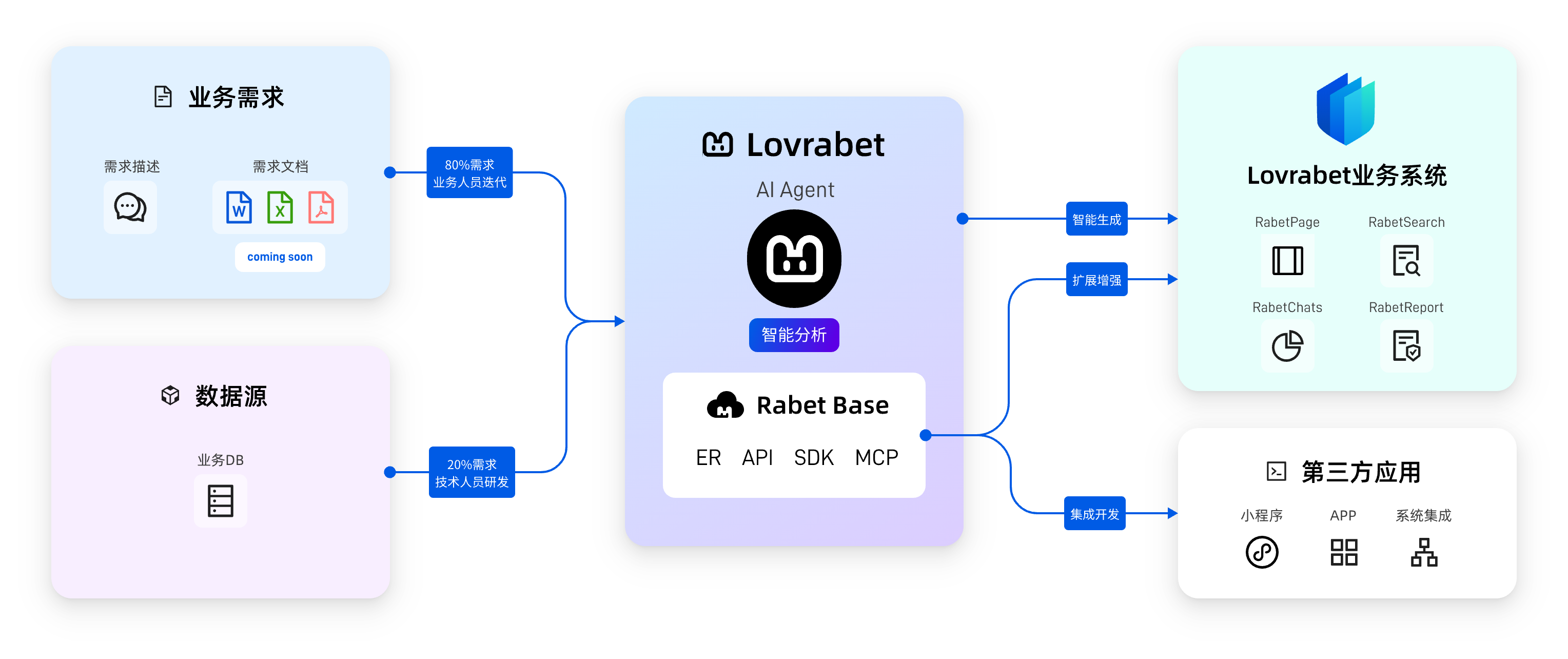
This diagram illustrates how the Lovrabet ecosystem works:
Left Side - Input:
- Business Requirements: Business users describe requirements in natural language or upload requirement documents
- Data Sources: Connect to existing enterprise MySQL databases
Middle - Lovrabet Platform:
- AI Agent: Analyzes business requirements and intelligently generates pages and features
- Rabet Base: Provides ER models, APIs, SDKs, MCP, and other developer capabilities
Right Side - Output:
- Lovrabet Business Systems: AI-generated management backends (RabetPage, RabetSearch, RabetChats, RabetReport)
- Third-party Applications: Mini programs, Apps developed by developers through Rabetbase integration, or integrations with other systems
What is the Core Value?
80% of requirements can be handled by business users themselves — describe in natural language, AI generates directly.
Only 20% of customized requirements need technical personnel to integrate and develop through Rabetbase.
This is why you're reading this documentation — you are the developer for that 20% of scenarios.
What is Rabetbase
Simply put, Rabetbase is Lovrabet's developer platform for technical roles.
Lovrabet Workbench is designed for business users, connecting to databases to generate management systems with AI. But there are always requirements that AI cannot handle:
- Building a WeChat mini program for customers
- Integrating with the company's existing ERP system
- Writing complex business logic
- Creating customized data dashboards
This is where Rabetbase comes in. It opens up Lovrabet platform's data capabilities (with business model understanding), allowing developers to:
- Call OpenAPI to read and write data
- Quickly integrate with TypeScript/Java SDK
- Use MCP to let AI coding assistants understand your business model
- Use CLI tools to boost development efficiency
Core Capability: AI Automatically Understands Your Business Data
After connecting to the database, Lovrabet's AI Architect Team (collaboration of multiple AI roles including super DBA, enterprise architect, etc.) will automatically complete:
1. Business Model Inference
- Analyze business relationships between tables (even if the database has no foreign key constraints)
- Identify business entities: which are customers, orders, products, users...
- Understand business processes: sales processes, approval processes, inventory flows...
2. Generate Development Resources with Business Semantics
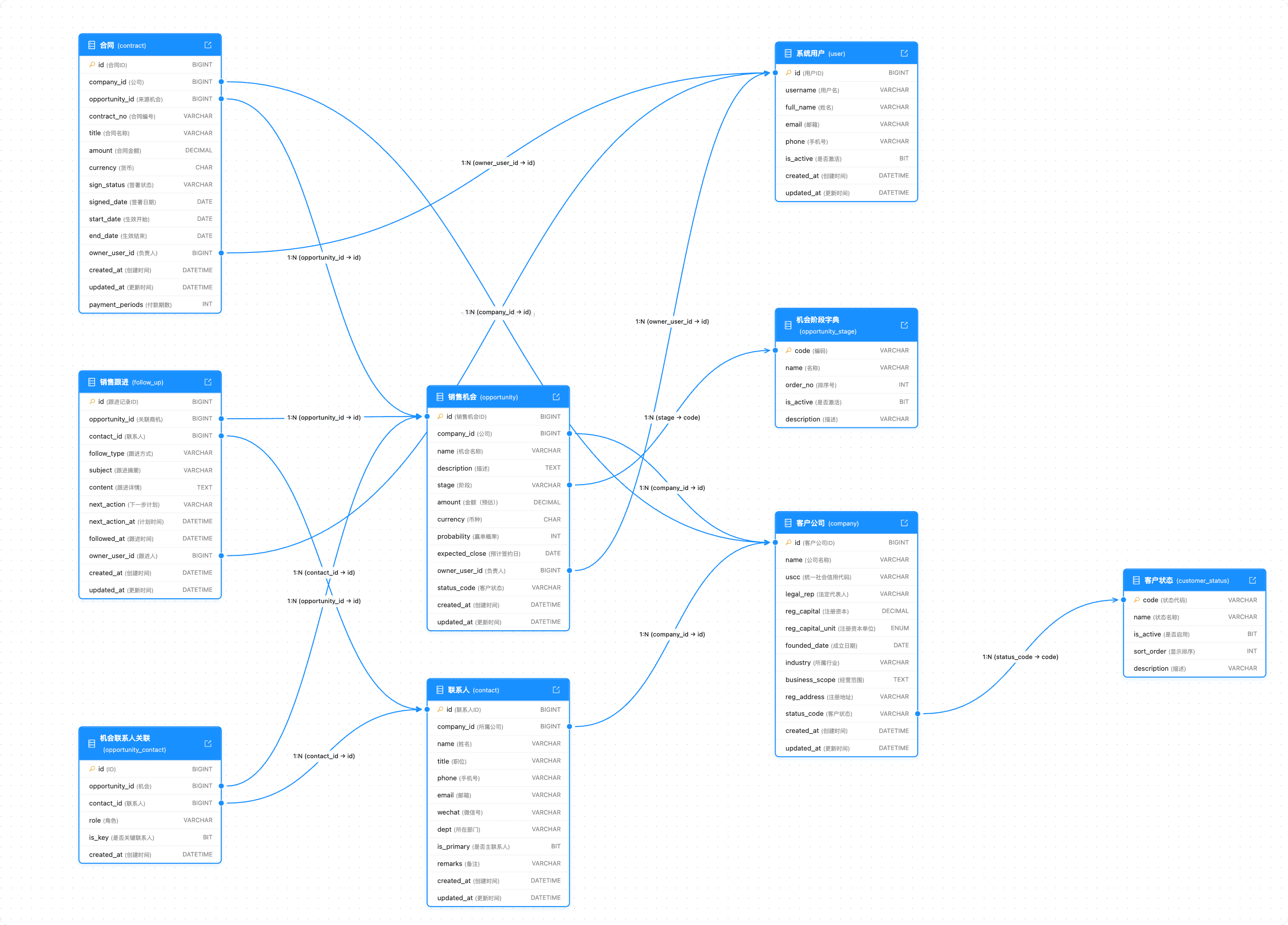
The inferred business model is injected into:
- API: Interfaces naturally understand business relationships, querying related data without manual JOIN
- SDK: Type definitions reflect real business structures
- MCP: Enables Claude/Cursor to truly understand your business, generating immediately usable code
3. Efficiency Boost 2-5x
Because AI understands the business model, you no longer need to repeatedly explain "what this table is" or "which table it's related to" during development. Code generation accuracy is significantly improved, reducing debugging and rework time.
What You Can Save
In traditional mode, you have to:
- Write a bunch of CRUD interfaces
- Build a management backend
- Handle authentication, permissions, pagination, and other common logic
- Coordinate frontend and backend
After using Rabetbase, you don't need to worry about these. Connect to the database and you immediately have:
- Ready-made API: Automatically generated CRUD interfaces for each table
- Ready-made Backend: AI-generated management system, ready for business users
- Ready-made SDK: TypeScript and Java, type-safe, ready to call
You only need to focus on writing business logic.
Create a project with CLI in minutes:
$ lovrabet create

* Project name: my-crm
* App AppCode [Optional]: app-c4c89304
√ Valid login status detected
* Do you want to automatically pull API configuration? ▶ Yes

✔ Copy project files
✔ Update project configuration
✔ Install npm dependencies
✔ Pull API configuration

🎉 Project created successfully!

  cd my-crm
  lovrabet start

📦 Generated APIs:
   └── src/api/
       ├── api.ts      # API interfaces for all data tables
       └── client.ts   # Encapsulated client, ready to use
Developer Tools Overview
| Tool | Purpose | Documentation |
|---|---|---|
| TypeScript SDK | Web frontend, Node.js backend calls | Quick Start |
| Java SDK | Spring Boot and other Java backend integration | Quick Start |
| OpenAPI | Direct API calls from mini programs, Apps | API Documentation |
| CLI | Create projects, generate configs, sync menus | User Guide |
| MCP | Let Claude/Cursor understand your data | Configuration |
How to Choose
| What You Want to Do | Use This |
|---|---|
| React / Vue / Next.js frontend project | TypeScript SDK |
| Spring Boot backend service | Java SDK |
| WeChat mini program / App | OpenAPI |
| Write code with AI (Claude / Cursor) | MCP |
Next Steps
Choose one to start:
- TypeScript SDK Quick Start
- Java SDK Quick Start
- OpenAPI Documentation
- Integration Development Guide (Complete integration development workflow)