List Page: Paginated Query and Filtering
- Query data lists with
filter - Implement keyword search
- Add status filtering
- Implement paginated loading
Estimated time: 20 minutes
What Are We Building?
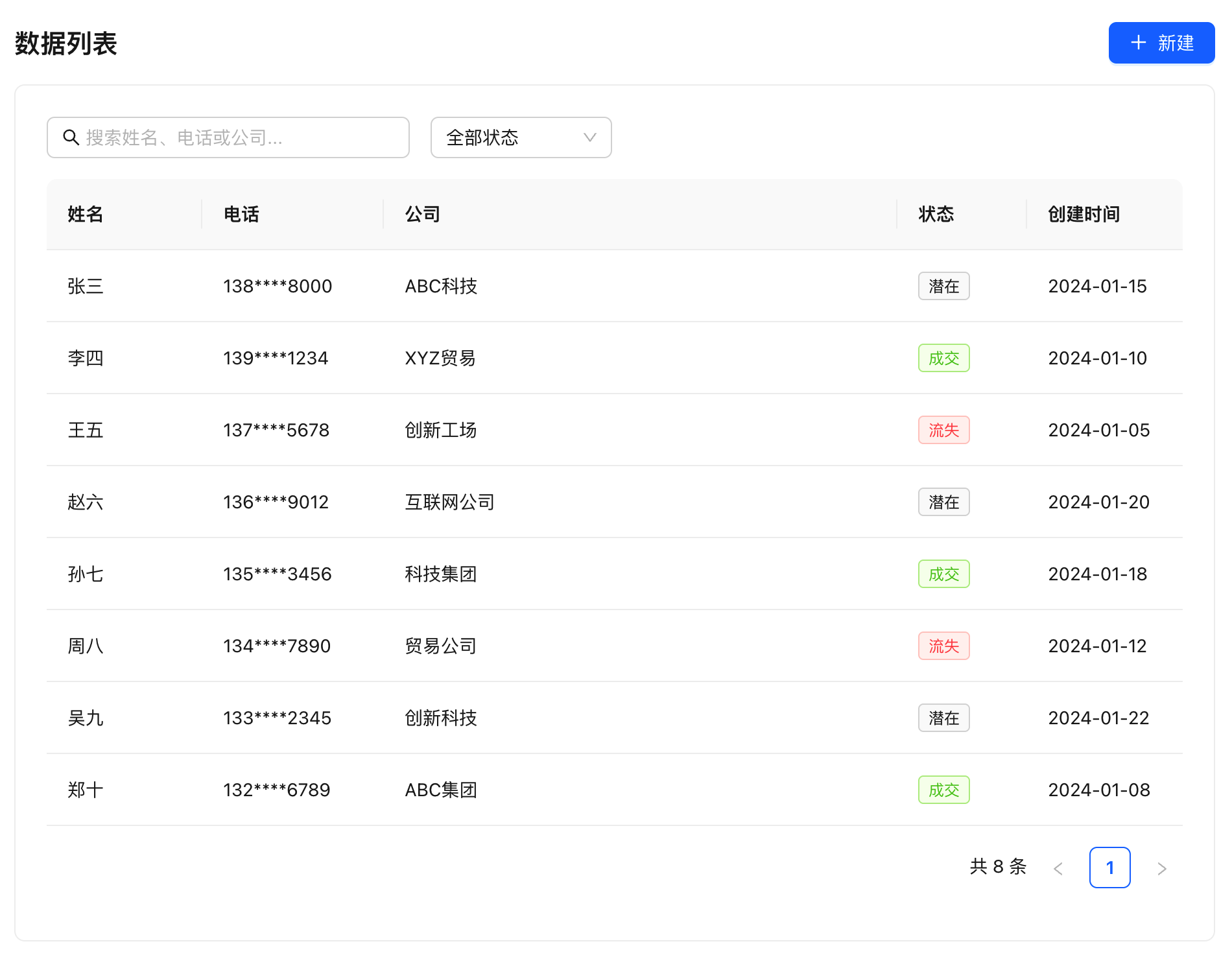
Develop a customer list page with the following features:
- Display customer data (name, phone, company, status)
- Support keyword search
- Support filtering by status
- Support paginated loading
AI-Assisted Development (Recommended)
Without rabetbase, building a customer list is not just about "getting field names right" -- there is no API to call in the first place. You need to build the backend first: the backend developer picks a framework (Laravel? Spring Boot? Express?), connects the database, writes the SQL SELECT * FROM customers LIMIT ? OFFSET ?, handles pagination parameters, adds authentication middleware, and configures CORS. The backend developer spends 3 days, while the frontend developer waits. When the backend is finally delivered, integration reveals: the backend calls pagination parameters page/size, but the frontend sends currentPage/pageSize; the backend returns status values as numbers 1/2/3, but the frontend treats them as strings "active". The field name is customer_name, not name -- another 2 days of fixes. One list page, one week of frontend-backend integration.
With rabetbase: no backend to build. BaaS provides the database, API, SDK, and authentication -- all ready. client.models.customers.filter() queries data in a single line. Parameter names, return values, and authentication methods are all built into the SDK. No SQL to write, no backend to wait for, no integration to debug, no CORS to configure. You only write the frontend page, done in 10 minutes.
Just Tell AI
Enter the following in Claude Code:
Use rabetbase CLI to help me create a customer list page that displays customer name, phone, company, and status. Support keyword search (searching name, phone, company), filtering by status, and pagination.
What AI Will Do
AI will use rabetbase CLI and SDK to automatically complete the following:
- Query the customer dataset structure (
rabetbase dataset detail) - Generate a complete React list page component (with
filter()query,$containfuzzy search,$eqstatus filtering, and pagination controls) - Configure routing and menu
Below is the complete code generated by AI, with step-by-step explanations for each feature.
Manual Steps (Alternative)
Follow the step-by-step code below, create component files in the src/pages/ directory, and manually write the list page.
Step 1: Understand the Data Structure
Before writing code, we need to know what fields the customer table has.
Option A: Ask AI (Recommended)
If you have MCP configured, just ask AI:
You: What fields does the customer table have?

AI: Found the customer dataset with the following fields:
- id: Customer ID (primary key)
- name: Name
- phone: Phone
- company: Company
- status: Status (enum: potential/active/lost)
- create_time: Created time
Option B: Check the Generated Configuration File
After creating the project with CLI, a src/api/api.ts file is automatically generated containing the configuration for all datasets.
// Example content in src/api/api.ts
export const LOVRABET_MODELS_CONFIG = {
  models: [
    {
      datasetCode: '8d2dcbae08b54bdd84c00be558ed48df',
      tableName: 'customer',
      name: 'Customer',
      alias: 'customers'  // Alias for easy reference
    }
  ]
};
Step 2: Write a Basic List
First, let's implement a simple list page without search or filtering.
Create a file in the src/pages/ directory:
// src/pages/customer-list.tsx

/**
 * Title: Customer List
 */
import { useState, useEffect } from "react";
import { lovrabetClient } from "../api/client";

export default function CustomerList() {
  const [customers, setCustomers] = useState([]);
  const [loading, setLoading] = useState(true);

  useEffect(() => {
    // Fetch customer list
    async function fetchCustomers() {
      try {
        const result = await lovrabetClient.models.customers.filter({
          pageSize: 20,  // 20 items per page
        });
        setCustomers(result.tableData);
      } catch (error) {
        console.error('Failed to fetch data:', error);
      } finally {
        setLoading(false);
      }
    }

    fetchCustomers();
  }, []);

  if (loading) {
    return <div>Loading...</div>;
  }

  return (
    <div>
      <h1>Customer List</h1>
      <table>
        <thead>
          <tr>
            <th>Name</th>
            <th>Phone</th>
            <th>Company</th>
            <th>Status</th>
          </tr>
        </thead>
        <tbody>
          {customers.map((customer: any) => (
            <tr key={customer.id}>
              <td>{customer.name}</td>
              <td>{customer.phone}</td>
              <td>{customer.company || '-'}</td>
              <td>{customer.status}</td>
            </tr>
          ))}
        </tbody>
      </table>
    </div>
  );
}
lovrabetClient.models.customers- Access the customer dataset (customers is the alias).filter()- Query method that returns paginated dataresult.tableData- Data array
Verify the Result
rabetbase run start
Open your browser and navigate to http://localhost:5173. You should see the customer list.
Step 3: Add Search
Now let's add a search box so users can search for customers.
// src/pages/customer-list.tsx

/**
 * Title: Customer List
 */
import { useState, useEffect } from "react";
import { lovrabetClient } from "../api/client";

export default function CustomerList() {
  const [customers, setCustomers] = useState([]);
  const [loading, setLoading] = useState(true);
  const [keyword, setKeyword] = useState("");  // New: search keyword

  useEffect(() => {
    async function fetchCustomers() {
      setLoading(true);
      try {
        const result = await lovrabetClient.models.customers.filter({
          where: keyword
            ? {
                // Search name, phone, or company (fuzzy match)
                $or: [
                  { name: { $contain: keyword } },
                  { phone: { $contain: keyword } },
                  { company: { $contain: keyword } },
                ],
              }
            : undefined,
          pageSize: 20,
        });
        setCustomers(result.tableData);
      } catch (error) {
        console.error('Failed to fetch data:', error);
      } finally {
        setLoading(false);
      }
    }

    fetchCustomers();
  }, [keyword]);  // Re-query when keyword changes

  return (
    <div>
      <h1>Customer List</h1>

      {/* New: search box */}
      <input
        type="text"
        placeholder="Search name, phone, or company..."
        value={keyword}
        onChange={(e) => setKeyword(e.target.value)}
        style={{ marginBottom: 16, padding: 8, width: 300 }}
      />

      <table>
        {/* ... table content unchanged ... */}
      </table>
    </div>
  );
}
$or- OR condition, matching any one is sufficient$contain- Fuzzy match, equivalent to SQL LIKE- The
useEffectdependency array includeskeyword, so it automatically re-queries when input changes
Step 4: Add Status Filtering
In addition to search, we also want to filter customers by status.
// src/pages/customer-list.tsx

/**
 * Title: Customer List
 */
import { useState, useEffect } from "react";
import { lovrabetClient } from "../api/client";

export default function CustomerList() {
  const [customers, setCustomers] = useState([]);
  const [loading, setLoading] = useState(true);
  const [keyword, setKeyword] = useState("");
  const [status, setStatus] = useState("");  // New: status filter

  useEffect(() => {
    async function fetchCustomers() {
      setLoading(true);
      try {
        // Build query conditions
        const conditions: any[] = [];

        // Status filter
        if (status) {
          conditions.push({ status: { $eq: status } });
        }

        // Keyword search
        if (keyword) {
          conditions.push({
            $or: [
              { name: { $contain: keyword } },
              { phone: { $contain: keyword } },
              { company: { $contain: keyword } },
            ],
          });
        }

        const result = await lovrabetClient.models.customers.filter({
          where: conditions.length > 0 ? { $and: conditions } : undefined,
          pageSize: 20,
        });
        setCustomers(result.tableData);
      } catch (error) {
        console.error('Failed to fetch data:', error);
      } finally {
        setLoading(false);
      }
    }

    fetchCustomers();
  }, [keyword, status]);  // Re-query when keyword or status changes

  return (
    <div>
      <h1>Customer List</h1>

      {/* Search and filter */}
      <div style={{ marginBottom: 16 }}>
        <input
          type="text"
          placeholder="Search..."
          value={keyword}
          onChange={(e) => setKeyword(e.target.value)}
          style={{ padding: 8, width: 200 }}
        />

        <select
          value={status}
          onChange={(e) => setStatus(e.target.value)}
          style={{ marginLeft: 8, padding: 8 }}
        >
          <option value="">All Statuses</option>
          <option value="potential">Potential</option>
          <option value="active">Active</option>
          <option value="lost">Lost</option>
        </select>
      </div>

      <table>
        {/* ... table content ... */}
      </table>
    </div>
  );
}
$and- AND condition, all conditions must be satisfied$eq- Equals, exact match- When both search and filter are active, use
$andto combine them
Step 5: Add Pagination
When data grows, pagination is needed. Let's add pagination functionality.
// src/pages/customer-list.tsx

/**
 * Title: Customer List
 */
import { useState, useEffect } from "react";
import { lovrabetClient } from "../api/client";

export default function CustomerList() {
  const [customers, setCustomers] = useState([]);
  const [loading, setLoading] = useState(true);
  const [keyword, setKeyword] = useState("");
  const [status, setStatus] = useState("");

  // New: pagination state
  const [page, setPage] = useState(1);
  const [total, setTotal] = useState(0);
  const pageSize = 20;

  useEffect(() => {
    async function fetchCustomers() {
      setLoading(true);
      try {
        const conditions: any[] = [];

        if (status) {
          conditions.push({ status: { $eq: status } });
        }

        if (keyword) {
          conditions.push({
            $or: [
              { name: { $contain: keyword } },
              { phone: { $contain: keyword } },
              { company: { $contain: keyword } },
            ],
          });
        }

        const result = await lovrabetClient.models.customers.filter({
          where: conditions.length > 0 ? { $and: conditions } : undefined,
          currentPage: page,      // Current page
          pageSize: pageSize,     // Items per page
          orderBy: [{ id: "desc" }],  // Sort by ID descending
        });

        setCustomers(result.tableData);
        setTotal(result.total);   // Total count
      } catch (error) {
        console.error('Failed to fetch data:', error);
      } finally {
        setLoading(false);
      }
    }

    fetchCustomers();
  }, [keyword, status, page]);  // Re-query when page changes too

  // Reset to first page when search or filter changes
  useEffect(() => {
    setPage(1);
  }, [keyword, status]);

  const totalPages = Math.ceil(total / pageSize);

  return (
    <div>
      <h1>Customer List</h1>

      {/* Search and filter */}
      <div style={{ marginBottom: 16 }}>
        <input
          type="text"
          placeholder="Search..."
          value={keyword}
          onChange={(e) => setKeyword(e.target.value)}
          style={{ padding: 8, width: 200 }}
        />

        <select
          value={status}
          onChange={(e) => setStatus(e.target.value)}
          style={{ marginLeft: 8, padding: 8 }}
        >
          <option value="">All Statuses</option>
          <option value="potential">Potential</option>
          <option value="active">Active</option>
          <option value="lost">Lost</option>
        </select>
      </div>

      {/* Data table */}
      <table>
        <thead>
          <tr>
            <th>Name</th>
            <th>Phone</th>
            <th>Company</th>
            <th>Status</th>
          </tr>
        </thead>
        <tbody>
          {loading ? (
            <tr><td colSpan={4}>Loading...</td></tr>
          ) : customers.length === 0 ? (
            <tr><td colSpan={4}>No data</td></tr>
          ) : (
            customers.map((customer: any) => (
              <tr key={customer.id}>
                <td>{customer.name}</td>
                <td>{customer.phone}</td>
                <td>{customer.company || '-'}</td>
                <td>{customer.status}</td>
              </tr>
            ))
          )}
        </tbody>
      </table>

      {/* New: pagination controls */}
      <div style={{ marginTop: 16 }}>
        <span>Total {total} items, Page {page}/{totalPages}</span>
        <button
          disabled={page <= 1}
          onClick={() => setPage(p => p - 1)}
          style={{ marginLeft: 8 }}
        >
          Previous
        </button>
        <button
          disabled={page >= totalPages}
          onClick={() => setPage(p => p + 1)}
          style={{ marginLeft: 8 }}
        >
          Next
        </button>
      </div>
    </div>
  );
}
currentPage- Current page number (starting from 1)pageSize- Items per pageresult.total- Total number of matching recordsorderBy- Sort order,descfor descending,ascfor ascending
Complete Code
Combining the code above, the complete page is as follows:
Click to view complete code
// src/pages/customer-list.tsx

/**
 * Title: Customer List
 */
import { useState, useEffect } from "react";
import { lovrabetClient } from "../api/client";

// Define customer data type
interface Customer {
  id: number;
  name: string;
  phone: string;
  company: string;
  status: "potential" | "active" | "lost";
  create_time: string;
}

// Status display names
const STATUS_LABELS: Record<string, string> = {
  potential: "Potential",
  active: "Active",
  lost: "Lost",
};

export default function CustomerList() {
  // Data state
  const [customers, setCustomers] = useState<Customer[]>([]);
  const [loading, setLoading] = useState(true);

  // Filter conditions
  const [keyword, setKeyword] = useState("");
  const [status, setStatus] = useState("");

  // Pagination
  const [page, setPage] = useState(1);
  const [total, setTotal] = useState(0);
  const pageSize = 20;

  // Fetch data
  useEffect(() => {
    async function fetchCustomers() {
      setLoading(true);
      try {
        // Build query conditions
        const conditions: any[] = [];

        if (status) {
          conditions.push({ status: { $eq: status } });
        }

        if (keyword) {
          conditions.push({
            $or: [
              { name: { $contain: keyword } },
              { phone: { $contain: keyword } },
              { company: { $contain: keyword } },
            ],
          });
        }

        const result = await lovrabetClient.models.customers.filter({
          where: conditions.length > 0 ? { $and: conditions } : undefined,
          currentPage: page,
          pageSize: pageSize,
          orderBy: [{ create_time: "desc" }],
        });

        setCustomers(result.tableData || []);
        setTotal(result.total || 0);
      } catch (error) {
        console.error("Failed to fetch data:", error);
      } finally {
        setLoading(false);
      }
    }

    fetchCustomers();
  }, [keyword, status, page]);

  // Reset page number when filters change
  useEffect(() => {
    setPage(1);
  }, [keyword, status]);

  const totalPages = Math.ceil(total / pageSize);

  return (
    <div style={{ padding: 24 }}>
      <h1>Customer List</h1>

      {/* Search and filter */}
      <div style={{ marginBottom: 16, display: "flex", gap: 8 }}>
        <input
          type="text"
          placeholder="Search name, phone, or company..."
          value={keyword}
          onChange={(e) => setKeyword(e.target.value)}
          style={{ padding: 8, width: 240 }}
        />
        <select
          value={status}
          onChange={(e) => setStatus(e.target.value)}
          style={{ padding: 8 }}
        >
          <option value="">All Statuses</option>
          <option value="potential">Potential</option>
          <option value="active">Active</option>
          <option value="lost">Lost</option>
        </select>
      </div>

      {/* Data table */}
      <table style={{ width: "100%", borderCollapse: "collapse" }}>
        <thead>
          <tr style={{ backgroundColor: "#f5f5f5" }}>
            <th style={thStyle}>Name</th>
            <th style={thStyle}>Phone</th>
            <th style={thStyle}>Company</th>
            <th style={thStyle}>Status</th>
            <th style={thStyle}>Created</th>
          </tr>
        </thead>
        <tbody>
          {loading ? (
            <tr>
              <td colSpan={5} style={tdStyle}>Loading...</td>
            </tr>
          ) : customers.length === 0 ? (
            <tr>
              <td colSpan={5} style={tdStyle}>No data</td>
            </tr>
          ) : (
            customers.map((customer) => (
              <tr key={customer.id}>
                <td style={tdStyle}>{customer.name}</td>
                <td style={tdStyle}>{customer.phone}</td>
                <td style={tdStyle}>{customer.company || "-"}</td>
                <td style={tdStyle}>{STATUS_LABELS[customer.status]}</td>
                <td style={tdStyle}>
                  {new Date(customer.create_time).toLocaleDateString()}
                </td>
              </tr>
            ))
          )}
        </tbody>
      </table>

      {/* Pagination */}
      <div style={{ marginTop: 16, display: "flex", alignItems: "center", gap: 8 }}>
        <span>Total {total} items</span>
        <button disabled={page <= 1} onClick={() => setPage((p) => p - 1)}>
          Previous
        </button>
        <span>
          Page {page} / {totalPages || 1}
        </span>
        <button disabled={page >= totalPages} onClick={() => setPage((p) => p + 1)}>
          Next
        </button>
      </div>
    </div>
  );
}

// Simple styles
const thStyle: React.CSSProperties = {
  padding: 12,
  textAlign: "left",
  borderBottom: "1px solid #ddd",
};

const tdStyle: React.CSSProperties = {
  padding: 12,
  borderBottom: "1px solid #eee",
};
Summary
You have learned:
| Concept | Description |
|---|---|
filter() | Query data lists |
where | Query conditions |
$eq | Equals |
$contain | Fuzzy match |
$and / $or | Logical operators |
currentPage / pageSize | Pagination parameters |
orderBy | Sorting |
FAQ
Q: Why use customers instead of dataset_xxx?
customers is an alias configured in src/api/api.ts for easier reference. You can also use the standard approach:
// Standard approach (using the full datasetCode)
lovrabetClient.models.dataset_8d2dcbae08b54bdd84c00be558ed48df.filter()

// Alias approach (more readable)
lovrabetClient.models.customers.filter()
Q: Search is not working?
Check the following:
- Are the field names correct (use database field names, not display names)
- Use
$contain, not$like - Make sure there is matching data in the database
Q: Pagination total count seems wrong?
result.total returns the total number of records matching the filter conditions, not the number of records on the current page.