Join Query: Display Customer Information in Orders
Previous chapters covered single-table operations. However, in real business scenarios, data is often interconnected -- orders need to display customer information, articles need to show author details, and employees need to display department names.
This chapter introduces two approaches to implement multi-table join queries: the JOIN capability of Filter API and Custom SQL, helping you choose the right approach for your scenario.
- Filter API multi-table join syntax
- Custom SQL for complex join queries
- How to choose the appropriate query approach
- Configuration methods for table relationships
Requirements
- Order list needs to display customer name and phone number
- Article list needs to display author name and avatar
- Employee list needs to display department name
- Support filtering and sorting by related table fields
Final Result:
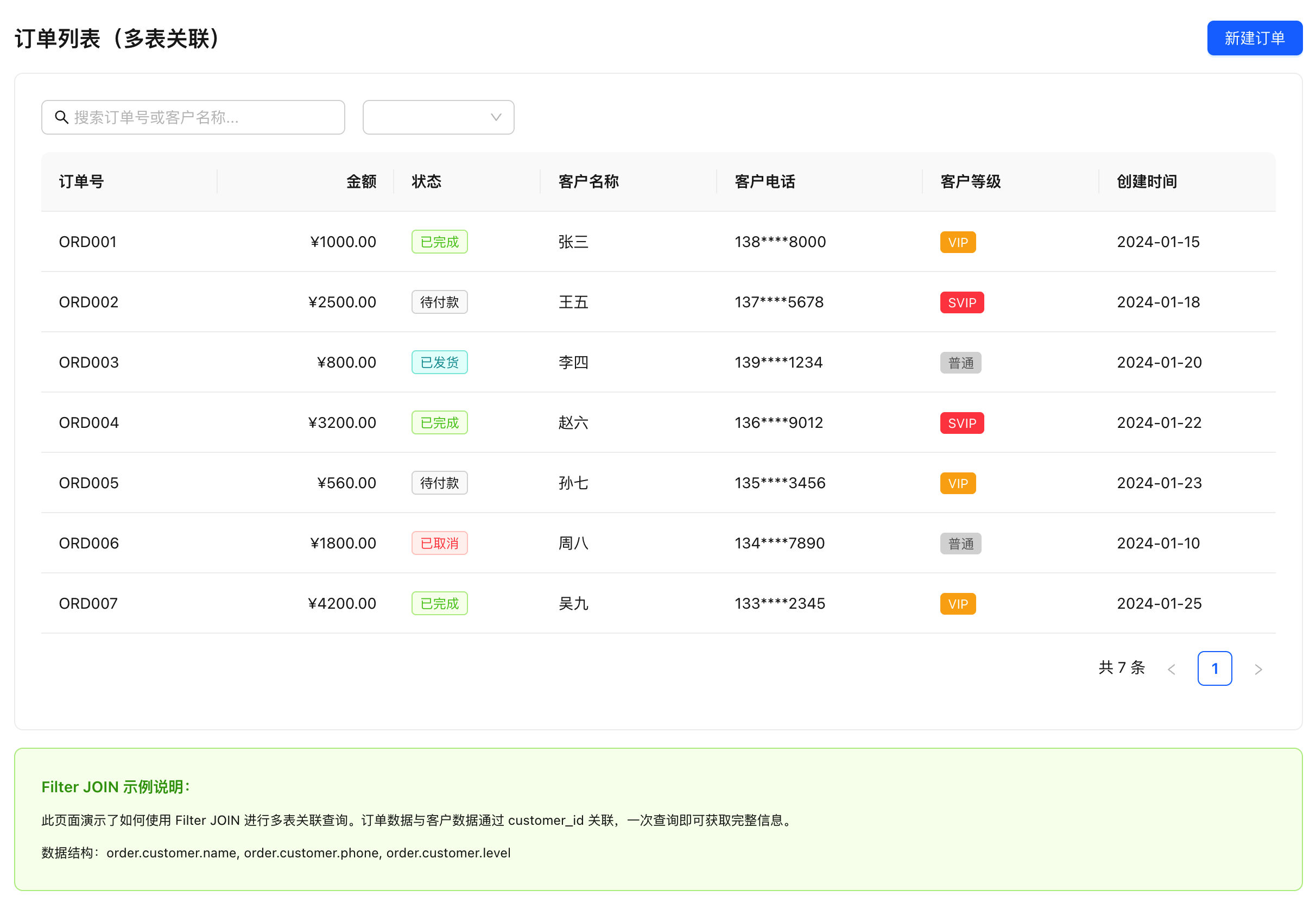
Comparison of Two Approaches
| Feature | Filter Multi-table Query | Custom SQL |
|---|---|---|
| Complexity | Low (uses JS object syntax) | Medium (requires SQL writing) |
| Type Safety | Full TypeScript support | Requires manual type definition |
| Maintainability | High (readable code) | Medium (scattered SQL) |
| Flexibility | Medium (supports standard joins) | High (any complex query) |
| Use Cases | Standard join queries (1:1, N:1) | Complex statistics, multi-table aggregation |
| Return Format | Structured objects (nested) | Flattened results |
Generally, prefer Filter multi-table queries (simple, type-safe), and use Custom SQL when that approach falls short.
Important Prerequisite: Relationship Configuration
Filter multi-table queries run based on table relationships analyzed by the Lovrabet Reverse Inference Engine. Only tables identified by the engine as having relationships can be joined.
Sources of Relationships:
- Automatic Detection: The system automatically identifies relationships between tables through reverse analysis of database structure (e.g., foreign keys, naming conventions)
- Manual Configuration: If two tables have a relationship but it wasn't detected, you can manually add it in the ER diagram configuration interface
ER Diagram Configuration URL: https://app.lovrabet.com/app/{appCode}/data/er
If Filter multi-table queries don't return related table data, please check:
- Whether the two tables have a configured relationship in the ER diagram
- Whether the relationship fields are correctly configured
- Whether you're using the database table name, not the dataset code
Approach 1: Filter Multi-table Query (Recommended)
Filter multi-table query is a built-in multi-table join feature of the SDK. It's simple to use and type-safe. The system automatically detects relationships between tables, uses LEFT JOIN uniformly, and supports up to 5 levels of nesting.
Syntax Format
Use tableName.fieldName format to reference related table fields:
await client.models.orders.filter({
  select: [
    "id", // Main table field
    "order_no",
    "customer.name", // Related table field: tableName.fieldName
    "customer.phone",
    "customer.level",
  ],
  where: {
    status: { $eq: "pending" },
    "customer.level": { $eq: "VIP" }, // Filter by related table field
  },
  orderBy: [
    { create_time: "desc" },
    { "customer.name": "asc" }, // Sort by related table field
  ],
});
Implementation Steps
Step 1: View and Configure Table Relationships
Filter multi-table queries are based on table relationships analyzed by the Lovrabet Reverse Inference Engine. Before using it, you need to confirm that the relationships between tables are correctly configured.
ER Diagram Configuration URL: https://app.lovrabet.com/app/{appCode}/data/er
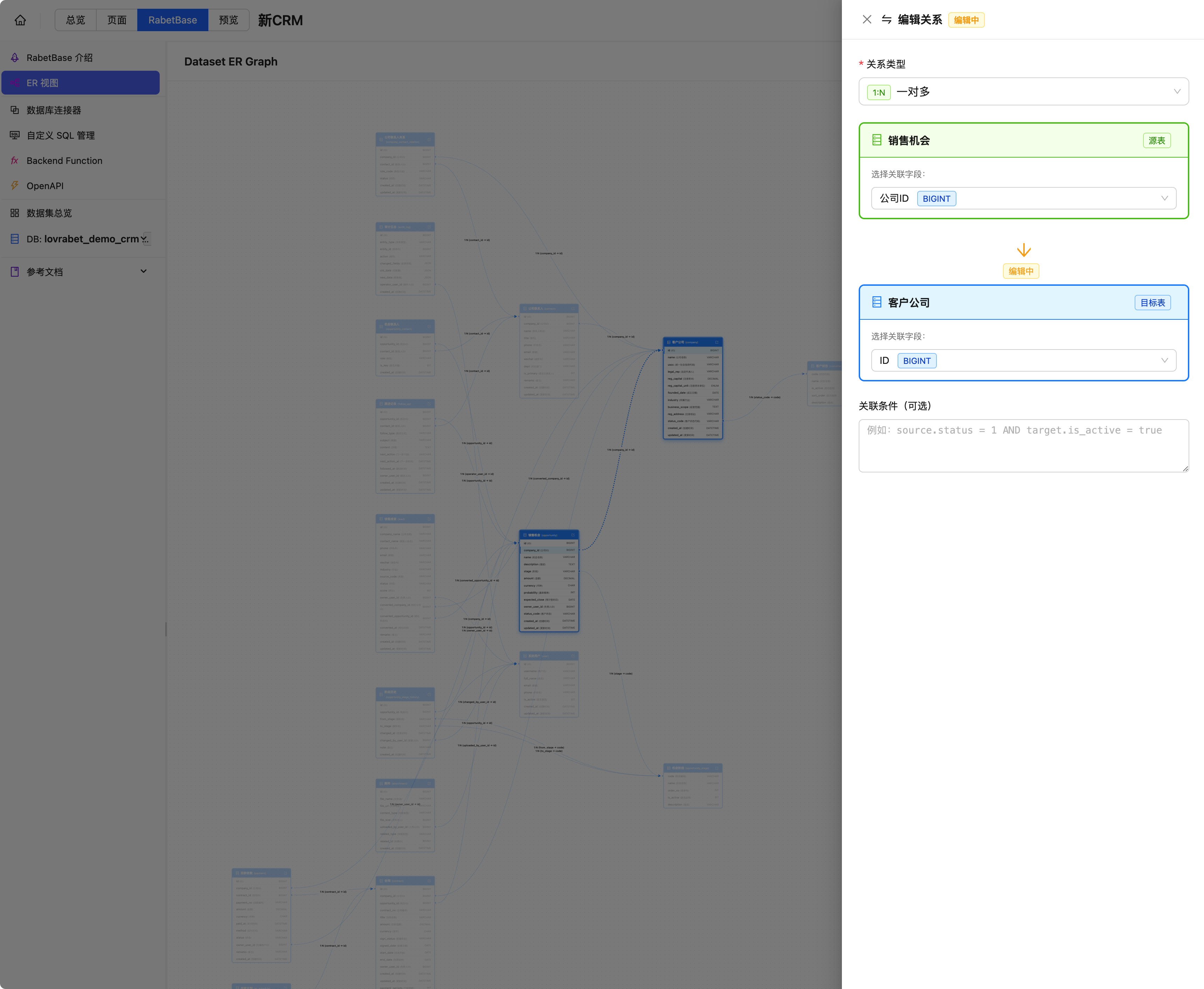
Operation Steps:
- Navigate to the ER diagram configuration interface
- View the automatically detected table relationships (shown as connection lines)
- If two tables have a relationship but no line is displayed, you can manually add it:
- Click the "Add Relationship" button
- Select the main table and related table
- Configure the relationship fields (e.g.,
orders.customer_id -> customers.id) - Choose the relationship type (1:1 or N:1)
Common Relationship Types:
| Relationship Type | Description | Example |
|---|---|---|
| 1:1 | One-to-one | User ← User Profile |
| N:1 | Many-to-one | Order → Customer |
| 1:N | One-to-many | Customer ← Order (reverse query not currently supported) |
Step 2: Query Using Filter Multi-table Query
Scenario 1: Orders with Customer Information
import { lovrabetClient } from "./api/client";

/**
 * Query order list with customer information
 */
async function getOrderListWithCustomer(page = 1) {
  const result = await lovrabetClient.models.dataset_orders.filter({
    select: [
      // Main table fields
      "id",
      "order_no",
      "total_amount",
      "status",
      "create_time",
      // Related table fields (customer is the related table name)
      "customer.name",
      "customer.phone",
      "customer.level",
      "customer.address",
    ],
    where: {
      // Filter by related table field
      "customer.level": { $in: ["VIP", "SVIP"] },
      status: { $ne: "cancelled" },
    },
    orderBy: [
      { create_time: "desc" },
      { "customer.level": "desc" }, // VIP shown first
    ],
    currentPage: page,
    pageSize: 20,
  });

  return result;
}

// Usage example
const result = await getOrderListWithCustomer(1);

console.log(result.tableData[0]);
// Output:
// {
//   id: 1,
//   order_no: "ORD20240115001",
//   total_amount: 1000,
//   status: "completed",
//   create_time: "2024-01-15T10:30:00Z",
//   customer: {                    // Related table data automatically nested
//     name: "Zhang San",
//     phone: "138****8000",
//     level: "VIP",
//     address: "Chaoyang District, Beijing"
//   }
// }
Scenario 2: Articles with Author Information
/**
 * Query published articles with author information
 */
async function getArticleListWithAuthor(page = 1) {
  const result = await lovrabetClient.models.dataset_articles.filter({
    select: [
      "id",
      "title",
      "summary",
      "publish_time",
      "author.username", // Author username
      "author.avatar_url", // Author avatar
      "author.bio", // Author bio
    ],
    where: {
      status: { $eq: "published" },
      "author.is_signed": { $eq: true }, // Only show contracted authors
    },
    orderBy: [{ publish_time: "desc" }, { "author.username": "asc" }],
    currentPage: page,
    pageSize: 10,
  });

  return result;
}
Scenario 3: Multi-level Join Query
/**
 * Query orders with customer and customer's sales representative
 * Supports up to 5 levels of nesting: orders -> customers -> sales_users
 */
async function getOrderListWithSales(page = 1) {
  const result = await lovrabetClient.models.dataset_orders.filter({
    select: [
      "id",
      "order_no",
      "total_amount",
      "customer.name", // Customer name (level 1)
      "customer.level", // Customer level
      "customer.sales.name", // Sales representative name (level 2)
      "customer.sales.phone", // Sales representative phone
      "customer.sales.dept.name", // Sales rep's department (level 3)
    ],
    where: {
      status: { $eq: "pending" },
      "customer.sales.dept.region": { $eq: "North China" },
    },
    orderBy: [{ create_time: "desc" }],
    currentPage: page,
    pageSize: 20,
  });

  return result;
}
Step 3: Use in React Component
// src/pages/order-list.tsx

import { useState, useEffect } from "react";
import { lovrabetClient } from "../api/client";

interface OrderWithCustomer {
  id: number;
  order_no: string;
  total_amount: number;
  status: string;
  create_time: string;
  customer: {
    name: string;
    phone: string;
    level: string;
  };
}

export default function OrderList() {
  const [orders, setOrders] = useState<OrderWithCustomer[]>([]);
  const [total, setTotal] = useState(0);
  const [currentPage, setCurrentPage] = useState(1);
  const [loading, setLoading] = useState(false);

  useEffect(() => {
    loadOrders();
  }, [currentPage]);

  const loadOrders = async () => {
    setLoading(true);
    try {
      const result = await lovrabetClient.models.dataset_orders.filter({
        select: [
          "id",
          "order_no",
          "total_amount",
          "status",
          "customer.name",
          "customer.phone",
          "customer.level",
        ],
        where: {
          status: { $ne: "deleted" },
        },
        orderBy: [{ create_time: "desc" }],
        currentPage,
        pageSize: 20,
      });

      setOrders(result.tableData);
      setTotal(result.total);
    } catch (error) {
      console.error("Failed to load orders:", error);
    } finally {
      setLoading(false);
    }
  };

  const getStatusName = (status: string) => {
    const names: Record<string, string> = {
      pending: "Pending Payment",
      paid: "Paid",
      shipped: "Shipped",
      completed: "Completed",
      cancelled: "Cancelled",
    };
    return names[status] || status;
  };

  const getLevelColor = (level: string) => {
    const colors: Record<string, string> = {
      SVIP: "#ff6b6b",
      VIP: "#ffd93d",
      Regular: "#a8dadc",
    };
    return colors[level] || "#ccc";
  };

  return (
    <div className="order-list">
      <h1>Order List (Total: {total})</h1>

      {loading ? (
        <div>Loading...</div>
      ) : (
        <table>
          <thead>
            <tr>
              <th>Order No.</th>
              <th>Amount</th>
              <th>Status</th>
              <th>Customer Name</th>
              <th>Customer Phone</th>
              <th>Customer Level</th>
            </tr>
          </thead>
          <tbody>
            {orders.map((order) => (
              <tr key={order.id}>
                <td>{order.order_no}</td>
                <td>¥{order.total_amount.toFixed(2)}</td>
                <td>{getStatusName(order.status)}</td>
                <td>{order.customer.name}</td>
                <td>{order.customer.phone}</td>
                <td>
                  <span
                    style={{
                      padding: "2px 8px",
                      borderRadius: "4px",
                      backgroundColor: getLevelColor(order.customer.level),
                    }}
                  >
                    {order.customer.level}
                  </span>
                </td>
              </tr>
            ))}
          </tbody>
        </table>
      )}

      {/* Pagination */}
      <div className="pagination">
        <button
          disabled={currentPage === 1}
          onClick={() => setCurrentPage(currentPage - 1)}
        >
          Previous
        </button>
        <span>Page {currentPage}</span>
        <button
          disabled={currentPage * 20 >= total}
          onClick={() => setCurrentPage(currentPage + 1)}
        >
          Next
        </button>
      </div>
    </div>
  );
}
Filter Multi-table Query Limitations
- Relationship Prerequisite: Two tables must have a configured relationship in the ER diagram (automatically detected or manually added), otherwise the query won't work
- Relationship Type Limitation: Currently supports 1:1 and N:1 relationships, reverse 1:N relationships are not yet supported
- Nesting Level: Maximum 5 levels of nesting supported
- Table Name Reference: Must use database table names, not dataset codes
If Filter multi-table queries don't return expected related data:
- Check ER diagram configuration:
https://app.lovrabet.com/app/{appCode}/data/er - Confirm there's a relationship line between the two tables
- Confirm you're using the database table name (e.g.,
customer) not the dataset code (e.g.,dataset_xxx)
Approach 2: Custom SQL
When Filter multi-table queries can't meet your needs (e.g., complex statistics, multi-table aggregation), you can use Custom SQL.
Use Cases
- Complex data statistics and aggregation
- Need to use database-specific functions
- Multi-table GROUP BY, HAVING queries
- Performance optimization (reduce query count)
Implementation Steps
AI-Assisted Development (Recommended)
You ask AI to write an order list that displays customer name and department name. AI writes JOIN departments d ON u.dept_id = d.id. When it runs, all departments are null -- because the join direction was reversed. It's not users.dept_id -> departments.id, but departments.manager_id -> users.id. AI doesn't know this, and you wouldn't think of it either. After spending an afternoon reviewing ER diagrams, you discover that orders -> customers is N:1 (one customer, many orders), but customers -> users is 1:1 (customer linked to sales rep), and users -> departments is N:1... Four tables joined in a chain, and AI got one segment's direction wrong, breaking the entire chain.
With rabetbase: the BaaS database reverse engine has already analyzed the complete ER relationship graph -- which table relates to which table, what the foreign key field is called, whether the relationship direction is 1:1 or N:1, all recorded. The CLI's dataset detail returns table structure and relationship fields. Skills guide AI to write correct JOIN queries based on known relationships -- ON orders.customer_id = customers.id, not guessed, but derived from the engine's analysis.
All You Need to Tell AI
In Claude Code, enter:
Use rabetbase CLI to help me create a custom SQL
getOrderWithCustomerthat joins orders, customers, users, and departments tables, supporting filtering by minimum amount, customer level, and sales department. Then generate frontend calling code.
What AI Will Do
AI will use rabetbase CLI to automatically complete the following:
- Query related dataset structures (
rabetbase dataset detail) - Create and save custom SQL (
rabetbase sql validate+rabetbase sql save) - Generate frontend TypeScript calling code
Once complete, you can query related data from the frontend via sql.execute(). Below is the SQL and frontend code generated by AI.
Manual Operation (Alternative)
Method 1: Manual CLI
# Create SQL file
mkdir -p .rabetbase/sql
# Edit .rabetbase/sql/getOrderWithCustomer.sql (refer to code below)

# Validate and save
rabetbase sql validate --file .rabetbase/sql/getOrderWithCustomer.sql --format json
rabetbase sql save --file .rabetbase/sql/getOrderWithCustomer.sql --db <dbId> --format json
rabetbase sql exec --sqlcode getOrderWithCustomer --params '{}' --format json
Method 2: Platform UI
Create on the platform's SQL management page: https://app.lovrabet.com/app/{appCode}/data/custom-sql
Step 1: SQL Code Reference
Whether using AI or manual operation, the SQL created is as follows:
SQL Name: getOrderWithCustomer
Create local SQL file .rabetbase/sql/getOrderWithCustomer.sql:
-- @lovrabet sqlName=getOrderWithCustomer description=Query orders with related customer information
SELECT
  o.id,
  o.order_no,
  o.total_amount,
  o.status,
  o.create_time,
  c.name AS customer_name,
  c.phone AS customer_phone,
  c.level AS customer_level,
  c.address AS customer_address,
  u.name AS sales_name,
  d.name AS sales_dept
FROM dataset_orders o
LEFT JOIN dataset_customers c ON o.customer_id = c.id
LEFT JOIN dataset_users u ON c.sales_id = u.id
LEFT JOIN dataset_departments d ON u.dept_id = d.id
WHERE o.status != 'deleted'
  <if test="minAmount">
    AND o.total_amount >= #{minAmount}
  </if>
  <if test="customerLevel">
    AND c.level = #{customerLevel}
  </if>
  <if test="salesDept">
    AND d.name = #{salesDept}
  </if>
ORDER BY o.create_time DESC
LIMIT #{pageSize} OFFSET #{offset}
After writing the SQL, validate and save it to the platform. If using AI-assisted development, this step is already done automatically.
Manual validation and save:
# Validate SQL syntax and parameters
rabetbase sql validate --file .rabetbase/sql/getOrderWithCustomer.sql --format json

# Save to platform (specify database ID for the first time)
rabetbase sql save --file .rabetbase/sql/getOrderWithCustomer.sql --db <dbId> --format json

# Test execution
rabetbase sql exec --sqlcode getOrderWithCustomer --params '{"pageSize":20,"offset":0}' --format json
Step 2: Call Custom SQL from Frontend
import { lovrabetClient } from "./api/client";

interface OrderWithCustomerFlat {
  id: number;
  order_no: string;
  total_amount: number;
  status: string;
  create_time: string;
  customer_name: string;
  customer_phone: string;
  customer_level: string;
  customer_address: string;
  sales_name: string;
  sales_dept: string;
}

/**
 * Query orders with related information using custom SQL
 */
async function getOrderListBySQL(params: {
  page?: number;
  pageSize?: number;
  minAmount?: number;
  customerLevel?: string;
  salesDept?: string;
}) {
  const {
    page = 1,
    pageSize = 20,
    minAmount,
    customerLevel,
    salesDept,
  } = params;

  const data = await lovrabetClient.sql.execute({
    sqlCode: "getOrderWithCustomer",
    params: {
      minAmount,
      customerLevel,
      salesDept,
      pageSize,
      offset: (page - 1) * pageSize,
    },
  });

  if (!data.execSuccess) {
    throw new Error("Query failed");
  }

  return {
    tableData: data.execResult || [],
    total: data.execResult?.length || 0, // Simplified handling, should return actual total
    currentPage: page,
    pageSize,
  };
}

// Usage example
const result = await getOrderListBySQL({
  page: 1,
  pageSize: 20,
  minAmount: 1000,
  customerLevel: "VIP",
});

console.log(result.tableData[0]);
// Output (flattened structure):
// {
//   id: 1,
//   order_no: "ORD20240115001",
//   total_amount: 1000,
//   status: "completed",
//   create_time: "2024-01-15T10:30:00Z",
//   customer_name: "Zhang San",
//   customer_phone: "138****8000",
//   customer_level: "VIP",
//   customer_address: "Chaoyang District, Beijing",
//   sales_name: "Li Si",
//   sales_dept: "North China"
// }
Step 3: Complex Statistical Query
SQL Name: getCustomerOrderStats
Create .rabetbase/sql/getCustomerOrderStats.sql:
-- @lovrabet sqlName=getCustomerOrderStats description=Customer order statistics
SELECT
c.id,
c.name,
c.phone,
c.level,
COUNT(o.id) AS order_count,
COALESCE(SUM(o.total_amount), 0) AS total_amount,
COALESCE(SUM(CASE WHEN o.status = 'completed' THEN o.total_amount ELSE 0 END), 0) AS completed_amount,
MAX(o.create_time) AS last_order_time
FROM dataset_customers c
LEFT JOIN dataset_orders o ON c.id = o.customer_id
<if test="startDate">
AND o.create_time >= #{startDate}
</if>
<if test="endDate">
AND o.create_time <= #{endDate}
</if>
WHERE c.status = 'active'
<if test="minLevel">
AND c.level = #{minLevel}
</if>
GROUP BY c.id, c.name, c.phone, c.level
HAVING COUNT(o.id) >= #{minOrderCount}
ORDER BY total_amount DESC
LIMIT #{pageSize} OFFSET #{offset}
Validate and save. If using AI-assisted development, this step is already done automatically.
Manual validation and save:
rabetbase sql validate --file .rabetbase/sql/getCustomerOrderStats.sql --format json
rabetbase sql save --file .rabetbase/sql/getCustomerOrderStats.sql --db <dbId> --format json
/**
 * Query customer order statistics
 */
async function getCustomerStats(params: {
  page?: number;
  pageSize?: number;
  startDate?: string;
  endDate?: string;
  minLevel?: string;
  minOrderCount?: number;
}) {
  const { page = 1, pageSize = 20, ...rest } = params;

  const data = await lovrabetClient.sql.execute({
    sqlCode: "getCustomerOrderStats",
    params: {
      ...rest,
      minOrderCount: rest.minOrderCount ?? 1,
      pageSize,
      offset: (page - 1) * pageSize,
    },
  });

  if (!data.execSuccess) {
    throw new Error("Query failed");
  }

  return data.execResult || [];
}
Custom SQL Return Data Structure
| Feature | Filter Multi-table Query | Custom SQL |
|---|---|---|
| Data Structure | Nested objects { customer: { name: "..." } } | Flattened { customer_name: "..." } |
| Field Naming | Original field names preserved | Requires AS aliases |
| Type Inference | Automatic type inference | Requires manual type definition |
Approach Comparison and Selection
Feature Comparison
| Scenario | Filter Multi-table Query | Custom SQL |
|---|---|---|
| Basic join query | Recommended | Available |
| Multi-level joins | Supported (5 levels) | Unlimited |
| Complex condition filtering | Supported | More flexible |
| Statistical aggregation | Not supported | Recommended |
| GROUP BY | Not supported | Supported |
| Window functions | Not supported | Supported |
| Database-specific functions | Not supported | Supported |
Performance Comparison
| Scenario | Filter Multi-table Query | Custom SQL |
|---|---|---|
| Simple joins | Comparable | Comparable |
| Complex joins | May have multiple queries | Single query complete |
| Large data volume | Limited by pagination | Can optimize LIMIT |
| Statistical queries | Not applicable | More efficient |
Selection Guide
┌─────────────────────────────────────────────────────────────────┐
│  Multi-table Join Query Selection Guide                         │
├─────────────────────────────────────────────────────────────────┤
│                                                                 │
│  Do you need complex statistics, GROUP BY, or window functions? │
│     │                                                          │
│     ├── Yes -> Use [Custom SQL]                                 │
│     │         - Order statistics, customer analysis, etc.       │
│     │         - Sales reports, data dashboards                  │
│     │         - Scenarios requiring database-specific functions │
│     │                                                          │
│     └── No -> Does it exceed 5 levels of nesting?               │
│               │                                                 │
│               ├── Yes -> Use [Custom SQL]                       │
│               │                                                 │
│               └── No -> Use [Filter Multi-table Query] (Recommended) │
│                       - Order list + customer info              │
│                       - Article list + author info              │
│                       - Employee list + department info         │
│                                                                 │
└─────────────────────────────────────────────────────────────────┘
Practical Case Study
Case: Sales Order Dashboard
Combining Filter multi-table queries and Custom SQL to implement a complete sales order dashboard.
Frontend Component
// src/pages/sales-dashboard.tsx

import { useState, useEffect } from "react";
import { lovrabetClient } from "../api/client";

export default function SalesDashboard() {
  const [summary, setSummary] = useState({
    totalOrders: 0,
    totalAmount: 0,
    vipCustomerCount: 0,
  });
  const [orders, setOrders] = useState([]);
  const [topCustomers, setTopCustomers] = useState([]);

  useEffect(() => {
    loadDashboard();
  }, []);

  const loadDashboard = async () => {
    // 1. Use Filter multi-table query to get order list (with customer info)
    const orderResult = await lovrabetClient.models.dataset_orders.filter({
      select: [
        "id",
        "order_no",
        "total_amount",
        "status",
        "create_time",
        "customer.name",
        "customer.level",
      ],
      where: {
        create_time: {
          $gte: new Date(Date.now() - 30 * 24 * 60 * 60 * 1000).toISOString(),
        },
      },
      orderBy: [{ create_time: "desc" }],
      currentPage: 1,
      pageSize: 10,
    });

    setOrders(orderResult.tableData);

    // 2. Use Custom SQL to get statistics
    const statsData = await lovrabetClient.sql.execute({
      sqlCode: "getSalesSummary",
      params: {
        startDate: new Date(Date.now() - 30 * 24 * 60 * 60 * 1000)
          .toISOString()
          .split("T")[0],
      },
    });

    if (statsData.execSuccess && statsData.execResult) {
      setSummary(statsData.execResult[0] || {});
    }

    // 3. Use Custom SQL to get top customers
    const topData = await lovrabetClient.sql.execute({
      sqlCode: "getTopCustomers",
      params: {
        limit: 10,
      },
    });

    if (topData.execSuccess && topData.execResult) {
      setTopCustomers(topData.execResult);
    }
  };

  return (
    <div className="sales-dashboard">
      <h1>Sales Order Dashboard</h1>

      {/* Summary cards */}
      <div className="summary-cards">
        <div className="card">
          <h3>Total Orders</h3>
          <p className="value">{summary.totalOrders}</p>
        </div>
        <div className="card">
          <h3>Total Amount</h3>
          <p className="value">¥{summary.totalAmount?.toFixed(2) || 0}</p>
        </div>
        <div className="card">
          <h3>VIP Customers</h3>
          <p className="value">{summary.vipCustomerCount}</p>
        </div>
      </div>

      {/* Latest orders */}
      <div className="section">
        <h2>Latest Orders</h2>
        <table>
          <thead>
            <tr>
              <th>Order No.</th>
              <th>Amount</th>
              <th>Status</th>
              <th>Customer Name</th>
              <th>Customer Level</th>
            </tr>
          </thead>
          <tbody>
            {orders.map((order: any) => (
              <tr key={order.id}>
                <td>{order.order_no}</td>
                <td>¥{order.total_amount.toFixed(2)}</td>
                <td>{order.status}</td>
                <td>{order.customer.name}</td>
                <td>{order.customer.level}</td>
              </tr>
            ))}
          </tbody>
        </table>
      </div>

      {/* Top customers */}
      <div className="section">
        <h2>Top Customers</h2>
        <ul>
          {topCustomers.map((customer: any, index) => (
            <li key={index}>
              {index + 1}. {customer.name} - ¥{customer.total_amount.toFixed(2)}
            </li>
          ))}
        </ul>
      </div>
    </div>
  );
}
Key Concepts Summary
Filter Multi-table Query Syntax
// select: Use tableName.fieldName
select: [
  "id",              // Main table field
  "customer.name",   // Related table field
  "customer.level"
]

// where: Use tableName.fieldName
where: {
  "customer.level": { "$eq": "VIP" }  // Related table field filter
}

// orderBy: Use tableName.fieldName
orderBy: [
  { "customer.name": "asc" }  // Related table field sort
]
Custom SQL Parameters
// Use #{paramName} in SQL
const data = await lovrabetClient.sql.execute({
  sqlCode: "getOrderWithCustomer",
  params: {
    minAmount: 1000,
    customerLevel: "VIP",
    pageSize: 20,
    offset: 0,
  },
});
FAQ
Q: Can Filter multi-table query and Custom SQL be used together?
A: Yes. In the same application, you can choose different approaches based on scenarios:
- List queries use Filter multi-table query (high development efficiency)
- Statistical reports use Custom SQL (better performance)
Q: How do I get the relationships between tables?
A: Filter multi-table queries are based on table relationships analyzed by the Lovrabet Reverse Inference Engine.
ER Diagram Configuration URL: https://app.lovrabet.com/app/{appCode}/data/er
The system automatically identifies relationships between tables through reverse analysis (e.g., foreign keys, naming conventions). If two tables have a relationship that wasn't detected, you can manually add the relationship in the ER diagram interface.
Q: What should I do if Filter multi-table query doesn't return related data?
A: Please troubleshoot with these steps:
-
Check ER diagram configuration: Confirm a relationship has been established between the two tables
- Visit
https://app.lovrabet.com/app/{appCode}/data/er - Check if there's a connection line between the two tables
- If not, manually add the relationship
- Visit
-
Check table name reference: Confirm you're using the database table name
// Correct: Using database table name
"customer.name";

// Wrong: Using dataset code
"dataset_xxx.name"; -
Check relationship direction: Confirm the relationship type is a supported 1:1 or N:1
Q: How is the performance of Filter multi-table queries?
A: Filter multi-table queries are ultimately converted to SQL LEFT JOIN, with performance comparable to hand-written SQL. For complex queries, Custom SQL may be more flexible and allow further optimization.
Q: How do I use related table data in the frontend?
A: Filter multi-table query returns a nested structure that needs to be accessed through objects:
// Filter multi-table query
order.customer.name;

// Custom SQL (flattened)
order.customer_name;
Section Summary
Congratulations on mastering multi-table join queries! Here's a comparison of the two approaches:
| Approach | Use Case | Characteristics |
|---|---|---|
| Filter Multi-table Query | Standard join queries | Simple, type-safe, nested structure |
| Custom SQL | Complex statistics and aggregation | Flexible, high performance, flattened results |
- Prefer Filter multi-table query (simple and easy to use)
- Use Custom SQL when needed (complex statistics)
- Ensure table relationships are configured in the ER diagram
Next Steps
- Sales Data Report -- Learn Custom SQL for complex statistics
Related Reading
Core Documentation
- Filter API Complete Guide -- Complete Filter multi-table query documentation
- SQL API Usage Guide -- Complete Custom SQL query documentation
- Multi-table Join Queries -- Complete Filter and SQL comparison
Advanced Topics
- Sales Report: Custom SQL -- Use SQL queries for complex statistics
- Backend Function Calling SQL -- BF calling Custom SQL
- Data Validation: Pre-validation Hook -- Backend data validation and permission control
Difficulty Level: L2 | Estimated Time: 50 minutes